Home >
Online Product Documentation >
Table of Contents >
Descriptions of WYSIWYG Terms
Descriptions of WYSIWYG Terms
The following terms are used to describe parts of the
WYSIWYG tab:
|
|
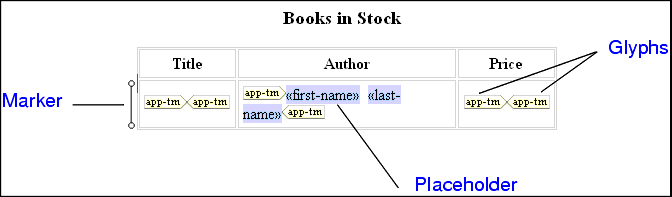
Figure 222. Parts of HTML Diagram in the WYSIWYG Tab
- placeholder - an element or attribute name in double angle brackets. It represents dynamic text.
- marker - a small image to the left of a placeholder or table row. Hold the cursor over a marker to see the XSLT instruction it represents and the context in which it operates.
- glyphs - pairs of images that specify choose, if, or repeat. The corresponding XSLT instruction operates on the text represented by the enclosed placeholder or element.
To remove the glyphs, select the enclosed item, and right-click it to display a pop-up menu. Click
Unwrap selected element.
 Cart
Cart