|
Home > Online Product Documentation > Table of Contents > Creating a Stylesheet from HTML Creating a Stylesheet from HTMLYou can create an XSLT stylesheet from an HTML file using the HTML to XSLT document wizard.
To run the HTML to XSLT document wizard:
1. Select
File > Document Wizards from the menu.
The Document Wizards dialog box appears.
2. Click the
XSLT Editor tab.
3. Double-click
HTML to XSLT (or select the
HTML to XSLT icon and click
OK).
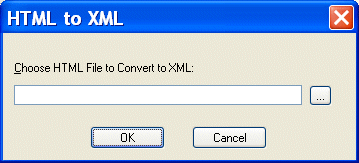
The HTML to XML dialog box appears.
4. Enter the name of the HTML file you want to convert to XSLT in the
Choose HTML File to Convert to XSLT field.
5. Click
OK.
Stylus Studio opens the converted HTML file as an untitled XSLT document in the XSLT Editor. |

Improving XSLT and XQuery Performance with Stylus Studio
This online video demonstration covers XQuery and XSLT performance tuning using the Stylus Studio XSLT profiler and the XQuery profiler.
Support for US National Library of Medicine (NLM) Document Type Definitions
Stylus Studio provides support for editing and validating XML documents using US National Library of Medicine data models. In this tutorial, we'll provide a step-by-step overview of how to use the NLM DTD's in Stylus Studio!
XQuery Editor
Stylus Studio's XQuery development tools are a tremendous help in building and testing XML applications requiring a standards-based approach to querying, integrating and transforming data from various distributed data sources.
XQuery Tools Support for TigerLogic XDMS
Stylus Studio's integration with the TigerLogic XDMS XQuery processor, allowing you to execute advanced XQuery expressions directly against any TigerLogic XDMS instance.