|
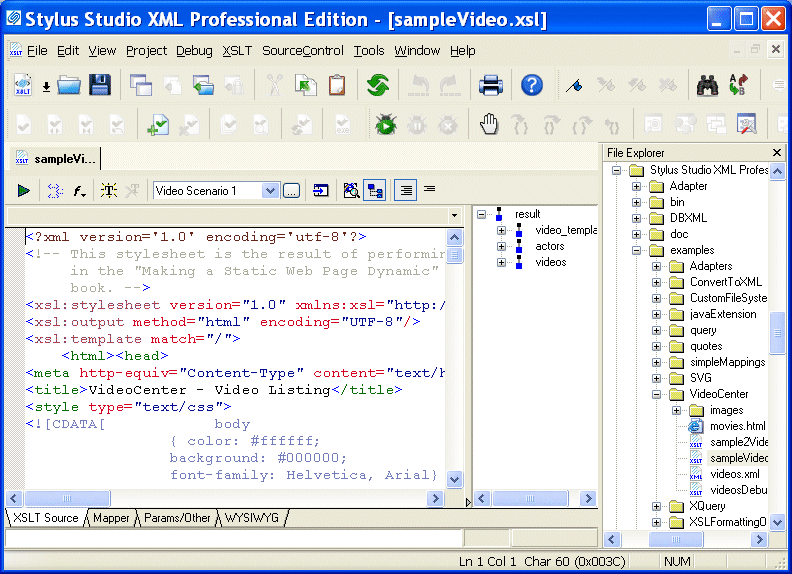
Home > Online Product Documentation > Table of Contents > About the XSLT Editor About the XSLT EditorThe XSLT editor, which displays a stylesheet when you open it, has four tabs at the bottom.
The XSLT Source, Mapper, and Params/Other tabs are always available. The WYSIWYG tab is available only when the stylesheet generates HTML.
Editing XSLT as XMLIf you want, you can edit an XSLT file as an XML file. To do this, open the stylesheet in the XML editor instead of in the XSLT editor. In the Open dialog box, click the down arrow in the Open button. Click XML Editor in the drop-down menu. A document can be open in the XML editor and in the XSLT editor at the same time. |

Validate XML Using XSD
You can validate XML documents against any data model defined using W3C XSD, using any major XSD Validator, including MSXML 3.0, MSXML 4.0, MSXML 6.0, Xerces-J, Xerces-C, Microsoft System.XML (1.0 and 2.0), XSV, the Saxonica XSD Validator and others.
XML Reports
Build beautiful XML reports from Relational, XML and Legacy Data. You XML report can be rendered in PDF or HTML using XSLT, XQuery or XSL:FO.
EDIFACT Reference
The EDIFACT Reference is a free developer resource providing the most in-depth information on EDIFACT constructs and data models.
Support for the Saxon XQuery Processor
Stylus Studio's XQuery tools feature integrated support for the Saxon SA 8.7.3 XQuery and XSLT processor so you can Edit, Debug and Run XQuery using Saxon. Java code generation support lets you deploy Saxon XQuery applications with just one click.