How to Generate Java Code for XQuery

To generate Java code for XQuery:
1. Define at least one scenario for the XQuery document for which you want to generate Java code. The scenario must use the Saxon or processor. See Scenario Settings for more information.
2. Select XQuery > Generate Java Code from the Stylus Studio menu.

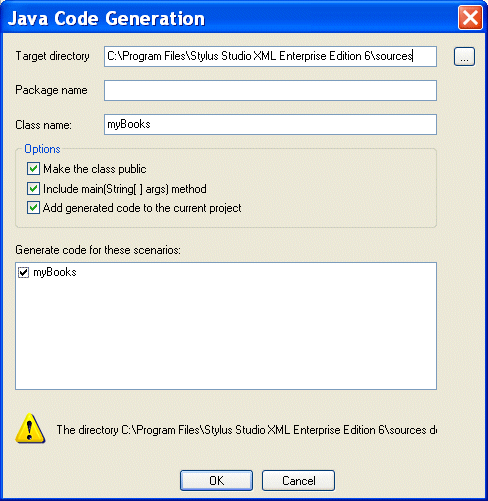
The Generate Java Code dialog box appears.

Figure 341. Java Code Generation Dialog Box

3. Specify the settings you want for the target directory, package and class names, and so on. See Java Code Generation Settings if you need help with this step.
4. Select the scenarios for which you want to generate Java code.
5. Click OK.

Stylus Studio generates Java code for the XQuery. When the code generation is complete, the resulting file (classname .java) is opened in the Stylus Studio Java Editor.

Consumer Food Products

Want to know what special ingredient is in these consumer food product companies work enviornment? Well it's a touch Stylus Studio that give these consumer food product companies the extra edge they need for producing such high quality food products!

The XML Primer: Editing and Validating XML in Stylus Studio

The XML primer demonstrates editing and validating XML in Stylus Studio demonstrates XML editing tools and utilities to simplify working with XML documents. Learn how to automate XML editing operations and troubleshoot XML documents today!

XML Parser

An XML Parser is a parser that is designed to read XML and create a way for programs to use XML. Learn about Stylus Studio's comprehensive support for all of the world's leading XML Parsers.

Oil, Gas & Electric Companies That Use Stylus Studio

Oil, gas & electric companies know a good resource when they see it. That's why they use Stylus Studio as their #1 XML resource. Come see which of these top oil, gas & electric companies are conserving their time and labor with Stylus Studio.

Stylus Most Wanted

 
Free Stylus Studio XML Training:
W3C Member