Debugging XQuery Documents

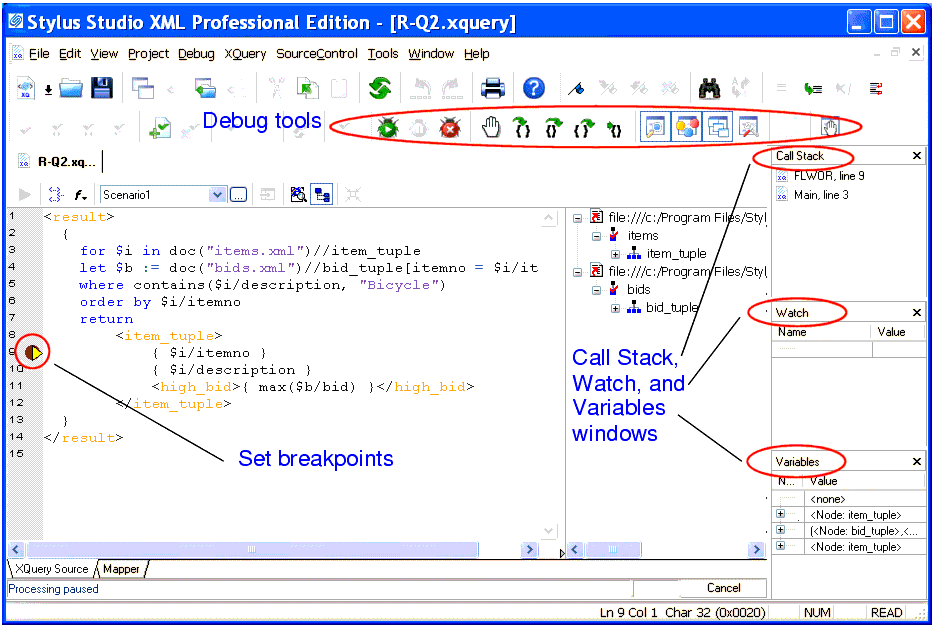
Complex XQuery documents require robust debugging features.

Figure 329. Debugging XQuery in Stylus Studio

With Stylus Studio, you can

  • Set breakpoints in your XQuery documents
  • Monitor the value of XQuery variables.
  • Trace the sequence of XQuery expressions that created output. With a click anywhere in the result, Stylus Studio Visual Backmapping technology displays the XQuery expression responsible for creating that result.
In this section

This section covers the following topics:

Stylus Studio Product Documentation

Stylus Studio product documentation consists of The Stylus Studio 6 User's Guide, An online Help system, Release Notes to keep you up to date with Stylus Studio's continuing innovations and enhancements.

XML Operations

Using XML Pipeline it's easy to visually specify a series of XML operations to apply on your XML data, including parsing, validating, converting and transforming, according to the needs of your business application.

XML Schema Library

The Stylus Studio XML Schema Library provides a detailed reference of many of the world's most commonly used XML vocabularies in an easy-to-read format.

Whitepaper: FIXML - Working with Complex Message Sets Defined Using XML Schema

The advanced XML Schema handling and presentation capabilities of Stylus Studio have valuable implications for users of industry-specific XML message sets.

Stylus Most Wanted

Site Map | Privacy Policy | Terms of Use | Trademarks
Free Stylus Studio XML Training:
W3C Member
Stylus Studio® and DataDirect XQuery™are products from DataDirect Technologies, is a registered trademark of Progress Software Corporation, in the U.S. and other countries. © 2004-2007 All Rights Reserved.