Home >
Online Product Documentation >
Table of Contents >
Scenario Settings
Scenario Settings
Stylus Studio generates Java code based on the scenarios you have defined for an XQuery document. The following tables summarizes the scenario settings that have an effect on Java code generation.
|
Tab
|
Comment
|
|
General
|
The Java Code Generation wizard uses only the
Main input and
Output URL fields, if specified.
|
|
Processor
|
You must use the Saxon or processor. The Stylus Studio URI Resolver is also used to resolve non-standard URIs if you select the check box on the
Processor page.
|
|
Parameter Values
|
Any parameter values you specify are processed by the Java Code Generation wizard.
|
|
Profiling Options
|
Ignored.
|
|
Validation
|
Validation is optional. If you choose to validate XQuery output, the Java Code Generation wizard always uses the Xerces-J processor, regardless of the validator you specify on the
Validation tab. If you want to specify external schemas for validation purposes, click
Use built-in validator. Note that the Xerces-J processor is used for validation even in this case.
|
Table 77. Scenario Settings that Affect Java Code Generation
Choosing Scenarios
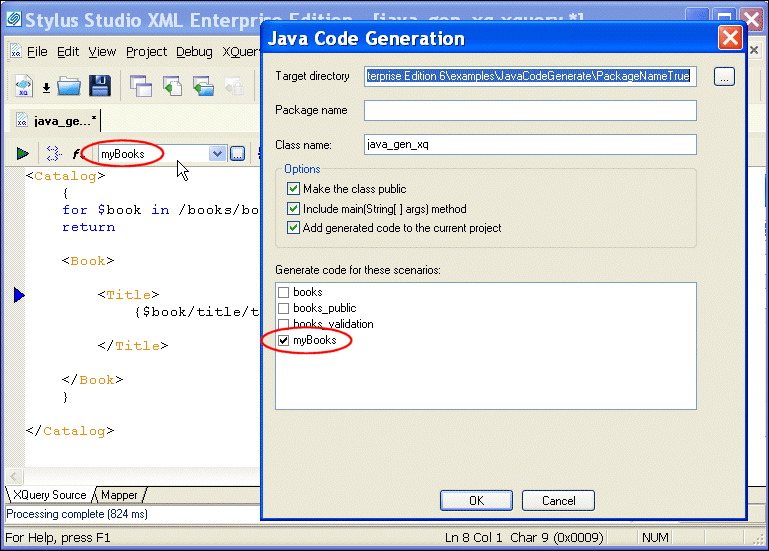
You can generate Java code for one or more of the scenarios defined for a single XQuery document. By default, the Java Code Generation wizard selects only the current scenario for generation, as shown in
Figure 340.
|
|
Figure 340. The Current Scenario Is Selected for Code Generation
The generated code includes a
setScenario method for every scenario you select for code generation, as shown in the following example.
Only one
setScenario method can be called at a time. Uncomment the
setScenario method for the scenario you want the code to process, and make sure that all other
setScenario methods are commented.
 Cart
Cart