IF Blocks

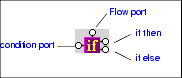
IF blocks have a single input port, labeled condition; a Flow port; and two result ports: if then, and if else.

Figure 327. IF Block

You use IF blocks to compose if then, else XQuery expressions, such as the following:


              		<Book>
               

              			{
               

              				if( $book/title ) then
               

              					<Title/>
               

              				else
               

              					<ISBN/>
               

              			}
               

              		</Book>


This expression, for example, was composed by mapping

  • The title element in the source document to the IF block's input port.
  • The if then result port to the Title element in the target structure.
  • The if else result port to the ISBN element in the target structure.

IF blocks create a structure if the if then or if else branches are true. These ports can be connected to the target schema; otherwise they can be connected to Flow ports of FLWOR, function, and other IF blocks.

XSL-List

The XSL-List forum is a valuable learning resource for the Extensible Stylesheet Language (XSL), covering the XSL specification, XSL processor implementations, and XSL user questions. Get this free XSL resource delivered to your inbox today.

XML Grid View

The XML Grid View is a visual interface for editing tablular data structures using an intuitive spreadsheet-like interface.

Learn XSLT and XQuery Profiling

Stylus Studio's Profiler can help you evaluate the performance of your XQuery and XSLT. Automatically generated, customizable, easy-to-read HTML reports provide insight into performance bottlenecks.

Learn Convert to XML

Convert to XML lets you convert .txt, binary, and EDI files to XML documents. Convert to XML works on a single document, or to build reusable converters that let you open flat files as XML documents. Free online demonstration!

Stylus Most Wanted

 
Free Stylus Studio XML Training:
W3C Member