|
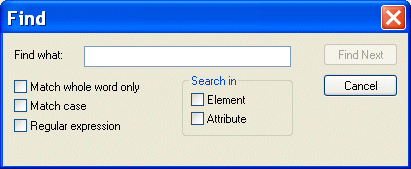
Home > Online Product Documentation > Table of Contents > Searching Document Panes Searching Document PanesYou can search document panes using the Find dialog box.
You can restrict your search to elements and/or attributes, and you can even search using regular expressions to define your match pattern. To display the Find dialog box:
1. Right-click in the document pane.
2. Select
Find from the shortcut menu.
|

Stylus Studio Product Documentation
Stylus Studio product documentation consists of The Stylus Studio User's Guide, An online Help system, Release Notes to keep you up to date with Stylus Studio's continuing innovations and enhancements.
Java XML Parser
Stylus Studio's support for Java XML Parser is able to Validate XML Using any Java XML Parser, Edit, Debug, Profile and Map XSLT using any Java XSLT Processor, Create PDF files Using Apache FOP, hand have Support for Microsoft XML Parsers as well.
Support for DataDirect SequeLink
Learn about Stylus Studio's support for DataDirect SequeLink, an end-to-end database middleware solution that provides a universal thin client for ODBC, JDBC, ADO or .NET, providing flexibility for both client- and server-based deployments.
Java Code Generation
The Stylus Studio Java Codce Generator lets you generate deployable Java code for XQuery and XSLT at the push of a button!