Cart
Cart
|
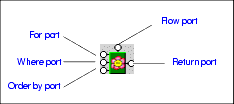
Home > Online Product Documentation > Table of Contents > FLWOR Blocks FLWOR BlocksThis section describes how to work with FLWOR blocks in the XQuery Mapper tab. It covers the following topics: Parts of a FLWOR BlockFLWOR blocks are drawn as a green block with an illustration of a flower at its center, and five connectors, called ports, placed along the block's border:
For, Order by, and Return ports
You define a FLWOR statement's
Where port
The input for the
Where port must be the output port of another block, such as a condition, IF, or function block. Imagine you have two source documents - you can create an Equal condition block, and specify that the content of an element in one source document must match the content of an element in the other source document, and map the return value of this condition to the
Where port on the FLWOR block. Creating an Equal condition that specifies that the
See IF Blocks and Function Blocks for information on using other types of blocks in XQuery mapper. Flow port
The
Flow port, which is also present on IF and function blocks, allows you to link the result from other FLWOR, IF, and function blocks to define a conditional execution order for your XQuery expressions. You might decide you want a particular
Creating a FLWOR BlockYou can create FLWOR blocks in the XQuery Mapper tab in one of two ways:
|

XML PRODUCTIVITY THROUGH INNOVATION ™