Using the Server URL Field

You use the Server URL field to identify the server hosting the database to which you want to connect, the port to use, and any other required or optional parameters. For example, the string used to connect to a Microsoft SQL Server database might look like this:
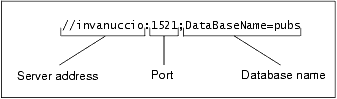
The specific syntax of the string you enter in the Server URL field varies based on database type. Consult your database documentation for information regarding connectivity syntax and optional parameters.

Tip


Stylus Studio populates the Server URL field with a default string appropriate for the database you specify in the Type field.

Mail, Package & Freight Delivery

Want to know what mail, package & freight delivery companies are shipping away there XML woes? Now you can! Check out these top mail, package & freight delivery companies that are packaged with the power of Stylus Studio.

An Introduction To XML Schema Development

An Introduction to XML schema development in Stylus Studio covers some of the highlights of our XML Schema Editor, powerful tools for editing, validating, converting and generating XML schema. Watch the video online today!

Translating EDIFACT Documents to XML

The EDIFACT to XML Converter is a primary component of the adapter library. The XML that is generated is well commented and indented, and can be used anywhere XML is normally used — with XML Schemas, XQuery, XSLT, and so on.

Convert HTML to XML

Convert HTML-to-XML with a Document Wizard that quickly converts any HTML to standard XML with the click of a button! To get started, just click File, Document Wizards on the Stylus Studio menu.

Stylus Most Wanted

 
Free Stylus Studio XML Training:
W3C Member
