Schema Pane

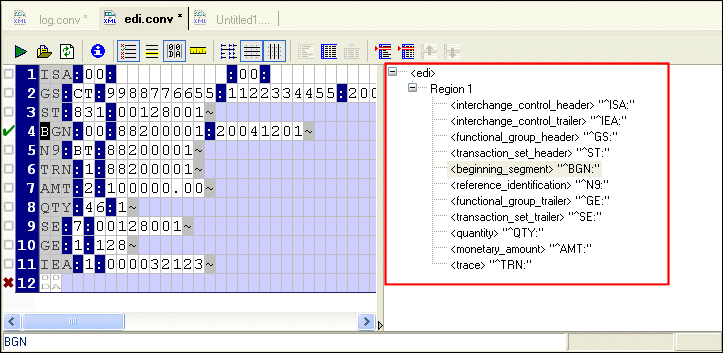
The schema pane displays a representation of the XML Schema for the XML document that will be output when the input file is converted to XML.

Figure 175. Schema Pane Shows Output Schema Representation

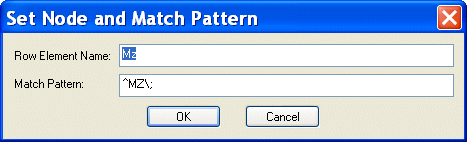
You can double-click on a row element to display the Set Node and Match Pattern dialog box, shown in Figure 176. This functionality provides an alternative to editing the row name and specifying a match pattern in the Properties window.

Figure 176. Set Node and Match Pattern Dialog Box

You can also edit schema node names directly in the schema pane - just click twice to place the node name in edit mode.

See Rows to learn more about specifying conversion properties for rows.

XQuery Tutorial

This XQuery Tutorial is about "BUILDING XQUERY BASED WEB SERVICE AGGREGATION AND REPORTING APPLICATIONS".

Flat File to XML Mapper

Convert any flat file to XML in 3 clicks or less using the Stylus Studio Flat File to XML Mapper. Supports tons of different file encodings: UTF-8, UTF-16, US-ASCII, ISO-8859-1, and more.

ZapThink Report: Using Stylus Studio to Deploy XML Data Services

A Zapthink analyst discusses how to create the next generation of XML data services using Stylus Studio XML tools - Download the special report today for free.

Stylus Studio User Guides (PDF Download)

Download Stylus Studio User Guides in printer-friendly PDF format, including documentation of past (older) versions of Stylus Studio.

Stylus Most Wanted

 
Free Stylus Studio XML Training:
W3C Member