Creating an Adapter

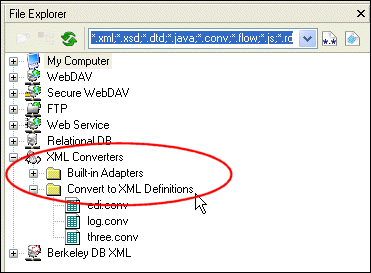
This procedure describes how to create and save a Convert to XML adapter ( .conv). All adapters are saved to the Convert to XML Definitions folder in the XML Converters file system by default, as shown in Figure 195.

Figure 195. User-Defined Adapters Saved to XML Converters File System

Developer Resource Center: Learn XML and Stylus Studio

Learning XML is easy with Stylus Studio. Check out our free XML tutorials, XML whitepapers, online video demonstrations, XML examples and XML references and more.

Using Stylus Studio with RenderX XEP

RenderX XEP is a production-quality engine that converts XSL:FO into PDF or PostScript files. You can use RenderX XEP in place of the Apache FOP engine to render PDF files from Stylus Studio.

Publishing & Printing

It is really hard to get things to look pretty, especially XML. That's why these publishing & printing companies use Stylus Studio to make a Mona Lisa out of data integration. Check out these top companies that are "stunning" with Stylus Studio!

XSLT Mapper

Simplify XSLT mapping with the Stylus Studio XSLT Mapper - supports multiple data sources, round-trip engineering (synchronized editing views), XSLT function blocks, integrated XSLT preview and more.

Stylus Most Wanted

 
Free Stylus Studio XML Training:
W3C Member