Using the Grid Tab


The XML Editor Grid tab is available only in Stylus Studio XML Enterprise Edition and Stylus Studio XML Professional Edition.

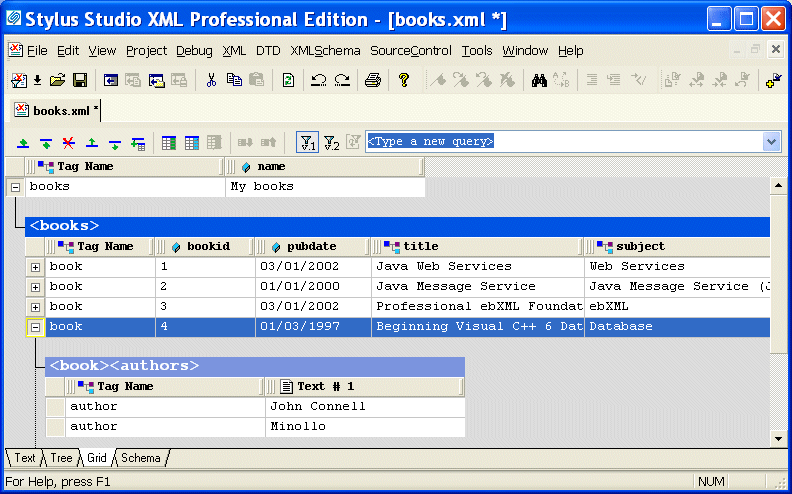
The Grid view of an XML document is useful for structured data - it is a convenient way to view and work with documents that contain multiple instances of the same type of element.

Figure 129. Grid View of books.xml

This section describes the features of the Grid tab and how to use it to edit XML documents. This section covers the following topics:


Watch it! You can view a video demonstration of this feature by clicking the television icon or by clicking this link: watch the XML Grid Editor video.

A complete list of the videos demonstrating Stylus Studio's features is here: http://www.stylusstudio.com/xml_videos.html.

Learn XSLT and XQuery Profiling

Stylus Studio's Profiler can help you evaluate the performance of your XQuery and XSLT. Automatically generated, customizable, easy-to-read HTML reports provide insight into performance bottlenecks.

Publishing & Printing

It is really hard to get things to look pretty, especially XML. That's why these publishing & printing companies use Stylus Studio to make a Mona Lisa out of data integration. Check out these top companies that are "stunning" with Stylus Studio!

Developer Resource Center: Learn XML and Stylus Studio

Learning XML is easy with Stylus Studio. Check out our free XML tutorials, XML whitepapers, online video demonstrations, XML examples and XML references and more.

Stylus Most Wanted

 
Free Stylus Studio XML Training:
W3C Member