Updating DOM Tree Structures

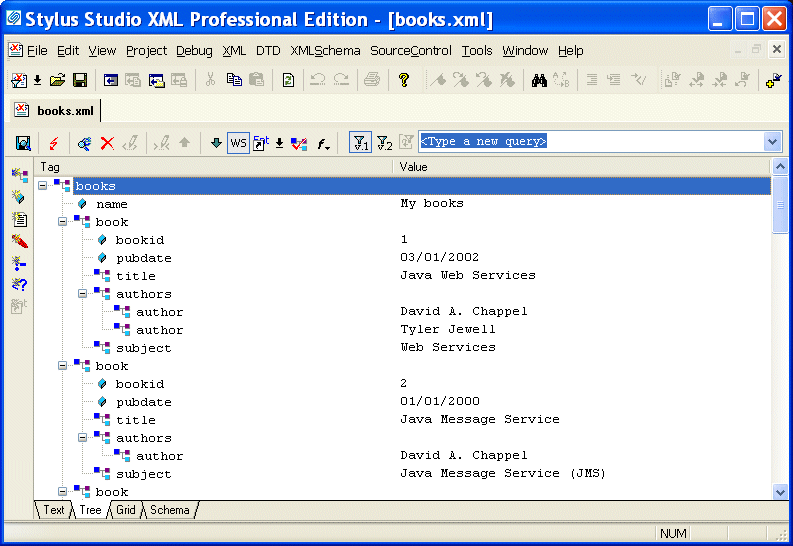
To update the DOM tree for an XML document, click the Tree tab at the bottom of the window that contains the document.

Figure 128. Tree Tab in XML Editor

While you are editing, if the display does not appear to correctly represent the current tree, click Reload Document in the main tool bar. If you want to perform a certain action and Stylus Studio has grayed out the button for that action, try clicking Refresh first.

To save your file, select File > Save from the Stylus Studio menu bar or click Save in the Stylus Studio tool bar.

This section discusses the following topics:

Oil, Gas & Electric Companies That Use Stylus Studio

Oil, gas & electric companies know a good resource when they see it. That's why they use Stylus Studio as their #1 XML resource. Come see which of these top oil, gas & electric companies are conserving their time and labor with Stylus Studio.

Converting Static HTML to XML

This video tutorial covers how to convert static HTML to XML.

XML Schema Editor

Stylus Studio's XML Schema Editor lets you easily develop advanced data models expressed in W3C XML Schema. Its synchronized split-pane interface shows both a visual XML Schema Diagram and the underlying code, and you can edit in either one.

HTML to XML Importer

Convert HTML to XML with the Stylus Studio HTML to XML Importer, a powerful, visual utility for Converting HTML to XML with ease.

Stylus Most Wanted

Site Map | Privacy Policy | Terms of Use | Trademarks
Free Stylus Studio XML Training:
W3C Member
Stylus Studio® and DataDirect XQuery™are products from DataDirect Technologies, is a registered trademark of Progress Software Corporation, in the U.S. and other countries. © 2004-2007 All Rights Reserved.