|
Home > Online Product Documentation > Table of Contents > How Grid Changes Affect the XML Document How Grid Changes Affect the XML DocumentWhen you make a change to the document structure or content on the Grid tab, those changes are reflected immediately in the underlying XML document. You can see your changes affect the document on the Text tab.
Consider the following excerpt from
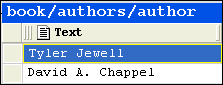
If you move the rows in the authors table, for example, as shown in Figure 136,
the underlying XML changes accordingly:
Types of Changes that Affect the DocumentThe following changes, all of which can be made using Grid tab, affect the underlying XML document:
Changes you make affect the current instance only. For example, in the example shown in
Figure 136, only that instance of the nested table is affected. If you add a column to
|

Xerces - Parsing and Validating XML with the Apache Xerces Parser
The Xerces Parser supports the XML 1.0 recommendation and W3C's XML Schema recommendation version 1.0, DOM and SAX. Learn how easy it is to use Apache Xerces directly in Stylus Studio to parse and validate XML with ease.
Oil, Gas & Electric Companies That Use Stylus Studio
Oil, gas & electric companies know a good resource when they see it. That's why they use Stylus Studio as their #1 XML resource. Come see which of these top oil, gas & electric companies are conserving their time and labor with Stylus Studio.
DOM - The Document Object Model
The Document Object Model (DOM) is a cross-platform interface for parsing and manipulating XML. Learn how Stylus Studio supports DOM in our XML Pipeline and other XML parsing tools.
XML-DEV Discussion Forum
XML-DEV is a leading technical forum for XML discussion and a valuable free XML learning resource. Subscribe to the XML-DEV email discussion forum today to help further your XML education.