Home >
Online Product Documentation >
Table of Contents >
Specifying the Nodes to Evaluate
Specifying the Nodes to Evaluate
Consider the
bookstore tree in the sample data. If you query the entire tree for all
author elements, the result contains a number of
author elements. If you query only one branch of the tree, the result contains only one
author element. The result of the query depends on which nodes the XPath processor evaluates in the execution of the query.
This section discusses the following topics:
Understanding XPath Processor Terms
To use the context operators, it is important to understand the following terms:
Axis
An
axis specifies a list of nodes in relation to the context node. For example, the
ancestor axis contains the ancestor nodes of the context node. The
child axis contains the immediate children of the context node. See
Syntax for Specifying an Axis in a Query.
Context Node
A context node is the node the XPath processor is currently looking at. The context node changes as the XPath processor evaluates a query. If you pass a document to the XPath processor, the root node is the initial context node. If you pass a node to the XPath processor, the node that you pass is the initial context node. During evaluation of a query, the initial context node is also the current node.
Context Node Set
A context node set is a set of nodes that the XPath processor evaluates.
Current Node
Current node is the node that the XPath processor is looking at when it begins evaluation of a query. In other words, the current node is the first context node that the XPath processor uses when it starts to execute the query. During evaluation of a query, the current node does not change. If you pass a document to the XPath processor, the root node is the current node. If you pass a node to the XPath processor, that node is the current node.
Document Element
The document element is the element in a document that contains all other elements. The document element is an immediate child of the root node. When you obtain the document element of a document, you obtain all marked-up text in that document.
Filter
A
filter in a query specifies a restriction on the set of nodes to be returned. For example, the filter in the following query restricts the result set to
book elements that contain at least one
excerpt element:
Location Path Expression
A location path expression is an XPath expression. It has the following format:
|
[/]LocationStep[/LocationStep]...
|
Location Step
An XPath expression consists of one or more location steps. A location step has the following format:
Node Test
You apply a
node test to a list of nodes. A node test returns nodes of a particular type or nodes with a particular name. For example, a node test might return all
comment nodes, or all
book elements.
Root Node
The
root node is the root of the tree. It does not occur anywhere else in the tree. The document element node for a document is a child of the root node. The root node also has as children processing instructions and
comment nodes representing processing instructions and comments that occur in the prolog and after the end of the document element.
Starting at the Context Node
Following is a query that looks for all child
author elements in the current context:
This query is simply the name of the element you want to search for. If the context node is any one of the
book elements, this query returns one
author element. If the context node is any other node, this query returns the empty set.
About Root Nodes and Document Elements
A root node is the topmost node in the tree that represents the contents of an XML document. The root node can contain comments, a declaration, and processing instructions, as well as the
document element. The document element is the element that contains all other elements; that is, the document element contains elements that are in the document but that are not immediate children of the root node.
Starting at the Root Node
To specify that the XPath processor should start at the root node when it evaluates nodes for a query, insert a forward slash (
/) at the beginning of the query.
In an XML document, there is no text that corresponds to the root node. Externally, a root node is really a concept. Internally, there are data structures that represent this concept, but there is no text that you can point to and call a root node.
The following query instructs the XPath processor to start at the root node, as indicated by the forward slash at the beginning of the query.
This query searches the children of the root node for a
bookstore element. Because the name of the document element is
bookstore, the query returns it. If the name of the document element is not
bookstore, this query returns an empty set.
The following query returns the entire document, starting with the root node. As you can see, the entire query is just a forward slash:
This query returns everything - comments, declarations, processing instructions, the document element, and any elements, attributes, comments, and processing instructions that the document element contains.
Descending Along Branches
Sometimes you want the XPath processor to evaluate all nodes that are descendants of a node and not just the immediate children of that node. This amounts to operating on a branch of the tree that forms the document.
To specify the evaluation of descendants that starts at the root node, insert two forward slashes (
//) at the beginning of a query.
To specify the evaluation of descendants that starts at the context node, insert a dot and two forward slashes (
.//) at the beginning of the query.
Following is a query that finds all
last-name elements anywhere in the current document:
Suppose the context node is the first
book element in the document. The following query returns a single
last-name element because it starts its search in the current context:
At the beginning of a query,
/ or
// instructs the XPath processor to begin to evaluate nodes at the root node. However, between tag names,
/ is a separator, and // is an abbreviation for the
descendant-or-self axis.
The
// selects from all descendants of the context node set. For example:
This query searches the current context for
book child elements that contain
award elements. If the
bookstore element is the context node, this query returns the two
award elements that are in the document.
For the sample
bookstore data, the following two queries are equivalent. Both return all
last-name elements in the document.
The first query returns all
last-name elements in the sample document or in any XML document. The second query returns all
last-name elements that are descendants of
author elements. In the sample data,
last-name elements are always descendants of
author elements, so this query returns all
last-name elements in the document. But in another XML document, there might be
last-name elements that are not descendants of
author elements. In that case, the query would not return those
last-name elements.
Tip:
// is useful when the exact structure is unknown. If you know the structure of your document, avoid the use of
//. A query that contains
// is slower than a query with an explicit path.
Explicitly Specifying the Current Context
If you want to explicitly specify the current context node, place a dot and a forward slash (
./) in front of the query. This construct typically appears in queries that contain
filters . The following two queries are equivalent:
Remember, if you specify the name of an element as a complete query (for example,
foo), you obtain only the
foo elements that are children of the current context node. You do not necessarily obtain all
foo elements in the document.
You can also specify the dot notation (
.) to indicate that you want the XPath processor to manipulate the current context. For example:
In this example, the XPath processor finds all
title elements. The dot indicates the context node. This causes the XPath processor to check each
title in turn to determine whether its string value is
History of
Trenton.
Specifying Children or Descendants of Parent Nodes
Sometimes you want a query to return information about a sibling of the context node. One way to obtain a sibling is to define a query that navigates up to the parent and then down to the sibling.
For example, suppose the context node is the first
author element. You want to find out the
title associated with this
author. The following query returns the associated
title element:
The double dot (
..)
at the beginning of the query instructs the XPath processor to select the parent of the context node. This query returns the
title elements that are children of the first
book element, which is the parent of the first
author element. In the
bookstore.xml document, there is only one such
title element.
Now suppose that the context node is still the first
author element and you want to obtain the
style attribute for the
book that contains this
author. The following query does this:
The double dot notation need not appear at the beginning of a query. It can appear anywhere in a query string, just like the dot notation.
Examples of XPath Expression Results
Table 61 provides examples of XPath expression results:
|
Expression
|
Result
|
|
|
Returns the document element of the document if it is an
a element
|
|
|
Returns all
b elements that are immediate children of the document element, which is the
a element
|
|
|
Returns all
a elements in the document
|
|
|
Returns all
b elements that are immediate children of
a elements that are anywhere in the document
|
|
|
Returns all
a elements that are immediate children of the context node
|
|
|
Returns all
b elements that are immediate children of
a elements that are immediate children of the context node
|
|
|
Returns all
b elements that descend from
a elements that are immediate children of the context node
|
|
|
Returns all
a elements in the document tree branch that starts with the context node
|
|
|
Returns all
a elements in the document tree branch that are children of the parent node of the context node.
|
Table 61. XPath Expression Results
Syntax for Specifying an Axis in a Query
The previous sections provide examples of XPath expression syntax that uses abbreviations. This section introduces you to the axis syntax that many of the abbreviations represent. For a list of XPath abbreviations, see
XPath Abbreviations Quick Reference.
You can use axis syntax to specify a location path in a query. An axis specifies the tree relationship between the nodes selected by an expression and the context node. The syntax for specifying an axis in a query is as follows:
The axis names are defined in
Supported Axes.
A node test is a simple expression that tests for a specified node type or node name. For example:
-
node() matches any type of node.
-
text() matches
text or
CDATA nodes.
-
comment() matches
comment nodes.
-
processing-instruction() matches any processing instruction.
-
processing-instruction(name
) matches processing instructions whose target is name.
- name matches elements or attributes whose name is name.
-
* matches any elements or any attributes.
XPath 2.0 adds additional tests, such as
-
element() matches any element node
-
attribute() matches any attribute node
-
document-node() matches any document node
In addition, you can follow the node test with any number of filters.
Supported Axes
The XPath processor supports all XPath axes:
About the child Axis
The
child axis contains the children of the context node. The following examples select the
book children of the context node:
If the context node is the
bookstore element, each of these queries return the
book elements in
bookstore.xml. When you do not specify an axis, the
child axis is assumed.
About the descendant Axis
The
descendant axis contains the descendants of the context node. A descendant is a child or a child of a child, and so on. The
descendant axis never contains attribute nodes. The following example selects the
first-name element descendants of the context node:
If the context node is the
bookstore element, this query returns all
first-name elements in the document. If the context node is the first
publication element, this query returns the
first-name element that is in the
publication element.
About the parent Axis
The
parent axis contains the parent of the context node, if there is one. The following example selects the parent of the context node if it is a
title element:
If the first
title element in
bookstore.xml is the context node, this query returns the first
book element.
Note that dot dot
(
..) is equivalent to
parent::node().
About the ancestor Axis
The
ancestor axis contains the ancestors of the context node. The ancestors of the context node consist of the parent of the context node and the parent's parent, and so on. The
ancestor axis always includes the root node, unless the context node is the root node. The following example selects the
book ancestors of the context node:
If the context node is the first
title element in
bookstore.xml, this query returns the first
book element.
About the following-sibling Axis
The
following-sibling axis contains all the siblings of the context node that come after the context node in document order. If the context node is an attribute node or namespace node, the
following-sibling axis is empty. The following example selects the next
book sibling of the context node:
If the context node is the first
book element in
bookstore.xml, this query returns the second
book element.
About the preceding-sibling Axis
The
preceding-sibling axis contains all the siblings of the context node that precede the context node in reverse document order. If the context node is an attribute node or namespace node, the
preceding-sibling axis is empty. The following example selects the closest previous
book sibling of the context node:
If the context node is the third
book element in
bookstore.xml, this query returns the second
book element. If the context node is the first
book element, this query returns the empty set.
About the following Axis
The
following axis contains the nodes that follow the context node in document order. This can include
- Following siblings of the context node
- Descendants of following siblings of the context node
- Following siblings of ancestor nodes
- Descendants of following siblings of ancestor nodes
The
following axis never includes
The following example selects the
book elements that are following siblings of the context node and that follow the context node in document order:
If the context node is the first
book element, this query returns the last three
book elements. If the context node is the second
book element, this query returns only the third and fourth
book elements.
About the preceding Axis
The
preceding axis contains the nodes that precede the context node in reverse document order. This can include:
- Preceding siblings of the context node
- Descendants of preceding siblings of the context node
- Preceding siblings of ancestor nodes
- Descendants of preceding siblings of ancestor nodes
The
preceding axis never includes
The following example selects the
book elements that are preceding siblings of the context node and that precede the context node in document order:
If the third
book element is the context node, this query returns the first two
book elements. If the first
book element is the context node, this query returns the empty set.
About the attribute Axis
The
attribute axis contains the attributes of the context node. The
attribute axis is empty unless the context node is an element. The following examples are equivalent. They both select the
style attributes of the context node. The at sign (@) is an abbreviation for the
attribute axis.
If the context node is the second
book element, this query returns a
style attribute whose value is
textbook.
About the namespace Axis
The
namespace axis contains the namespace nodes that are in scope for the context node. This includes namespace declaration attributes for the
If more than one declaration defines the same prefix, the resulting node set includes only the definition that is closest to the context node.
If the context node is not an element, the
namespace axis is empty.
For example, if an element is in the scope of three namespace declarations, its
namespace axis contains three namespace declaration attributes.
About the self Axis
The
self axis contains just the context node itself. The following example selects the context node if it is a
title element:
Note that dot (
.)
is equivalent to
self::node().
About the descendant-or-self Axis
The
descendant-or-self axis contains the context node and the descendants of the context node. The following example selects the
first-name element descendants of the context node and the context node itself if it is a
first-name element:
If the context node is the
first-name element that is in the
author element in the second
book element, this query returns just the context node. If the context node is the second
book element, this query returns the two
first-name elements contained in the second
book element.
Note that
// is equivalent to
descendant-or-self::node(), while
//name is equivalent to
descendant-or-self::node()/child::name.
About the ancestor-or-self Axis
The
ancestor-or-self axis contains the context node and the ancestors of the context node. The
ancestor-or-self axis always includes the root node. The following example selects the
author element ancestors of the context node and the context node itself if it is an
author element:
If the context node is the
award element in the first
book element, this query returns the first
author element.
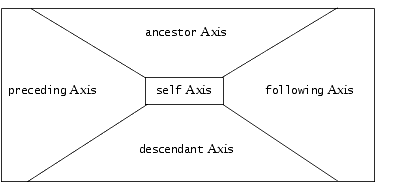
Axes That Represent the Whole XML Document
The following group of axes represent an entire XML document:
-
ancestor
-
preceding
-
self
-
following
-
descendant
There is no overlap among these axes, as shown in the following figure:
 Cart
Cart