Sample Data for Examples and Testing

The best way to learn how to query data is to practice using queries. To prepare you for testing queries, this section provides a review of the basic structure of an XML document. An understanding of this structure is crucial to defining queries that return the data you want. Following the review, this section includes the XML data on which the query examples operate. The last part of this section provides instructions for running queries on sample data.

The topics in this section include

About XML Document Structure

The XPath processor operates on a tree representation of XML data that looks like the following figure:
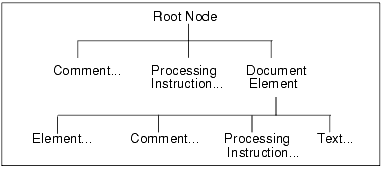
The root node has no actual text associated with it. You can think of the file name as the root node. A document can include zero or more comments and zero or more processing instructions.

A document element is required, and there can be only one. The document element contains all elements in the document. For example:
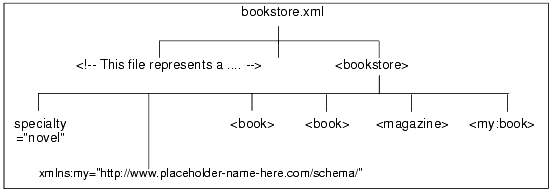
In the preceding figure, bookstore.xml is the name of a file that contains XML data. There is a comment near the beginning of the document that starts with "This file represents a ..." The document element is bookstore. The immediate children of bookstore include an attribute, a namespace declaration (not supported by Stylus Studio), three book elements (one is in the my namespace), and a magazine element. The book and magazine elements contain elements and attributes, which are shown in the figure that appears in Tree Representation of a Sample XML Document.

A Sample XML Document

The examples in this section are based on the following XML data. This data is in the bookstore.xml file, which is in the examples directory of your installation directory.

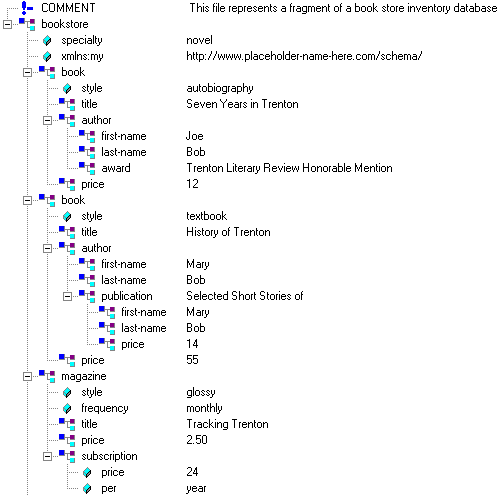
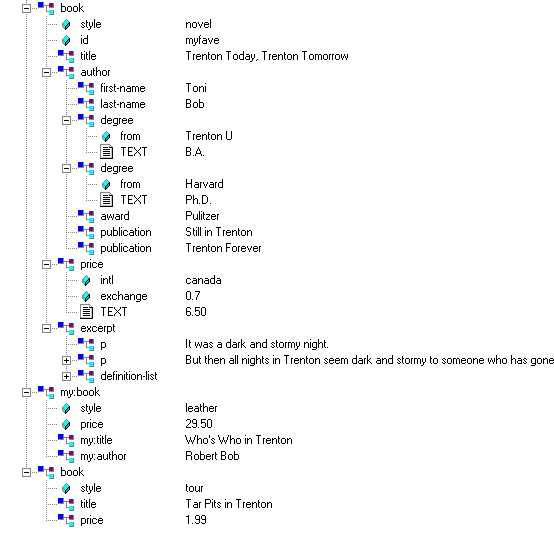
Tree Representation of a Sample XML Document

When you query a document, it can be helpful to think of a tree representation of your data. A tree that represents the bookstore.xml document appears in Figure 269 (and is continued in Figure 270). To use Stylus Studio to view a similar tree for any XML document, open the XML document in Stylus Studio and select the Tree tab.

Figure 269. Tree Display of an XML Document

Figure 270. Tree Display of an XML Document (continued)

Steps for Trying the Sample Queries

To try the queries in this section, or any other queries you want to run on the bookstore.xml document, follow these instructions:

1. In Stylus Studio, open bookstore.xml. You can find it in the examples directory of your installation directory.
2. At the top of the window that contains bookstore.xml, highlight <Type a new query>.
3. Type a query. For example: /bookstore/book/author.
4. Press Enter or click Refresh Query .

Stylus Studio displays the results in the Query Output window.

Java IDE

Edit, compile and debug and generate Java code with Stylus Studio's Java Integrated Development Environment (IDE). Supports popular Java XML processing components including Apache Xalan, Apache Axis, Apache Xerces, Saxon and more.

Java Web Services

Stylus Studio's Web Service Call Composer simplifies Java Web Service development by making it easy to find, invoke, and test any Java Web Service deployed on any popular Java Web Service framework, such as Apache AXIS.

Simple API for XML (SAX)

SAX stands for Simple API for XML - SAX is an XML standard used everywhere in Stylus Studio, for parsing and building representations of XML documents.

Business Solutions & Outsourcing

Business Solutions & Outsourcing companies know the best solutions. That's why they choose Stylus Studio to enhance their business productivity. See which companies are already using Stylus Studio 2006 to take care of their own business!

Stylus Most Wanted

Site Map | Privacy Policy | Terms of Use | Trademarks
Free Stylus Studio XML Training:
W3C Member
Stylus Studio® and DataDirect XQuery™are products from DataDirect Technologies, is a registered trademark of Progress Software Corporation, in the U.S. and other countries. © 2004-2007 All Rights Reserved.