Creating a Template That Matches the book Element

This topic is part of a sequence that starts with Creating a New Sample Stylesheet.

The template that matches the root node includes an xsl:apply-templates instruction that selects book nodes for processing.

To define the template that matches the book element:
1. In the XSLT editor source document tree pane, expand the bookstore element.
2. Double-click the book element.

Stylus Studio creates a template that matches the book element. The new template is near the end of the stylesheet and has the form <xsl:template match="book">. In the tree pane, the yellow check next to the book element indicates that there is a template that matches this element.

3. In the XSLT editor pane, add the following instructions to the new template's body:
<tr>
               
<td><xsl:apply-templates select="title"/></td>
               
<td><xsl:apply-templates select="author"/></td>
               
<td align="right"> 


<xsl:apply-templates select="price"/>


</td>
                   
</tr>


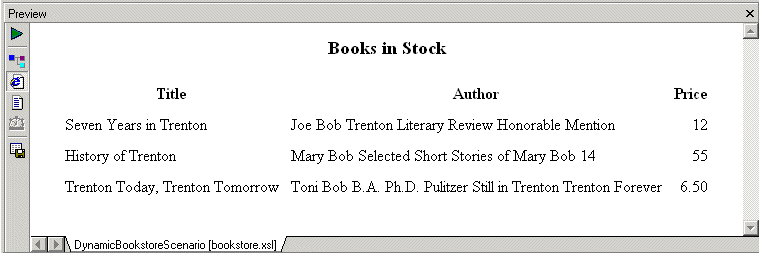
Press F5 to see the results. The result document looks like that shown in Figure 169:

Figure 169. Result of Applying XSLT

In the book template, the xsl:apply-templates instructions cause the XSLT processor to instantiate the default templates. For the title and price elements, this works correctly because those elements include only a text node. But for the author element, the use of the default templates copies too much information to the result table. You need to explicitly define a template for the author element.

XSD Documentation Generator

Stylus Studio®'s XSD Editor includes an integrated XSD documentation generator, allowing you to easily publish XML content models defined in XSD in a convenient, HTML format.

Generate XSD

Stylus Studio® can generate an industry standard W3C XSD (or DTD) by correctly inferring an XML data model from an XML instance document.

Introduction to the XQuery Mapper

This free online video demonstration covers Stylus Studio's synchronized XQuery editing and mapping tool which allows you to create any XQuery expression, either manually using Stylus Studio's XQuery editor.

XML Operations

Using XML Pipeline it's easy to visually specify a series of XML operations to apply on your XML data, including parsing, validating, converting and transforming, according to the needs of your business application.

Stylus Most Wanted

Site Map | Privacy Policy | Terms of Use | Trademarks
Free Stylus Studio XML Training:
W3C Member
Stylus Studio® and DataDirect XQuery™are products from DataDirect Technologies, is a registered trademark of Progress Software Corporation, in the U.S. and other countries. © 2004-2007 All Rights Reserved.