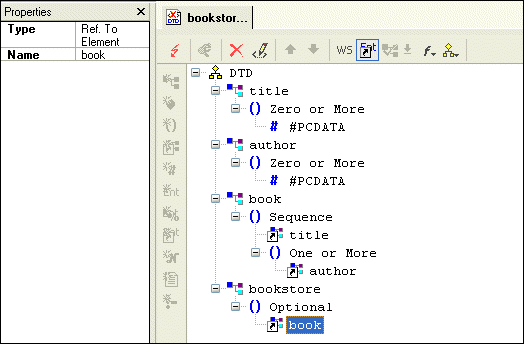
Examining the Tree of a Sample DTD

This topic is part of a sequence that starts with Creating a Sample DTD.

Your DTD should now look like Figure 67.

i

Figure 67. Finished bookstore.dtd

To complete this DTD, you could define magazine and newsletter elements. In the bookstore element definition, you could add references to the magazine and newsletter elements. You could also expand the definition of the book element to include information about the publisher, price, publication date, and number of pages.

XML Validator

Stylus Studio has a built-in XML validator that supports industry-standard DTD and XML Schema validators including MSXML 4.0 SAX, MSXML 4.0 DOM, Microsoft .NET XML Parser (System.XML), Xerces-J 2.5.1, XSV 2.6, etc. Validate XML with Stylus Studio.

Java Code Generation

The Stylus Studio Java Codce Generator lets you generate deployable Java code for XQuery and XSLT at the push of a button!

Saxon XSLT Processor

Stylus Studio® has partnered with Saxonica, a leading provider of Java-based XSLT and XQuery processing components to offer a robust XSLT 1.0 and 2.0 development environment, featuring development and deployment using the Saxon XSLT processor.

OASIS Catalog Support

Stylus Studio's features for working with OASIS catalogs allow you to incorporate any vendor's catalog - or one of your own - in your XML, making writing correct and robust XML easier than ever.

Stylus Most Wanted

 
Free Stylus Studio XML Training:
W3C Member