Defining Structure Rules in a Sample DTD

This topic is part of a sequence that starts with Creating a Sample DTD.

To specify the rules for the structure of the book element:
1. Click the book node in the DTD tree if it is not already selected.
2. Click New Modifier .
3. In the drop-down list that appears, scroll down and double-click Sequence. This indicates that the book element can include one or more elements.
4. Click New Reference to Element .
5. Type title in the entry field and press Enter.

Because the reference to the title element appears immediately after the Sequence modifier, the DTD editor assumes that the default behavior is what is wanted. That is, the book element must contain exactly one instance of the title element.

6. Click the Sequence modifier.
7. Click New Modifier .
8. Double-click One or More. (There can be one or more author elements in each book element.)
9. Click New Reference to Element .
10. Type author in the entry field and press Enter.

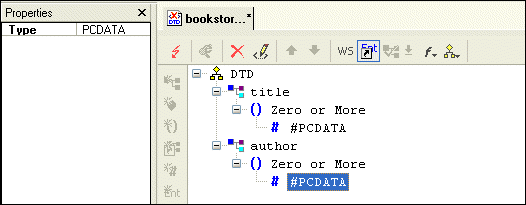
At this point, the definition of the book element is complete, and the tree diagram of bookstore.dtd should look like this:

Figure 66. Early Steps of bookstore.dtd

However, you have not yet specified that you want the book element itself to be optional. You need to do this in the element that references the book element. For example, suppose the bookstore element is the root element in XML documents that use this DTD. Further suppose that you want the book element to be a child of the bookstore element.

You can define the bookstore element as follows:
1. Click the DTD node at the top of the tree.
2. Click New Element Definition .
3. Type bookstore in the entry field and press Enter.
4. Click New Modifier .
5. In the drop-down list that Stylus Studio displays, double-click Optional.
6. Click New Reference to Element .
7. Type book in the entry field and press Enter.
8. Click Save

Hotels, Casinos & Resorts That Use Stylus Studio

What's more romantic than a vacation for two and the world's best XML IDE at your finger tips? Nothing, that's why these hotels, casinos, & resorts are using Stylus Studio to help you get on your dream vacation.

Varying Record Layout to XML

Not every row in a text file has to have the same layout. Convert to XML has advanced pattern-recognition tools to route the data to where it belongs.

Convert EDIFACT to XML Schema

Convert EDIFACT to XML with Stylus Studio's XML Schema and legacy data integration tools.

XPath Editor

Stylus Studio's intelligent code-sensing, auto-completion technology, Sense:X, is XPath-aware. You'll find Sense:X for XPath in all of Stylus Studio's editors, including the XML Editor, XSLT Editor, and XQuery Editor.

Stylus Most Wanted

Site Map | Privacy Policy | Terms of Use | Trademarks
Free Stylus Studio XML Training:
W3C Member
Stylus Studio® and DataDirect XQuery™are products from DataDirect Technologies, is a registered trademark of Progress Software Corporation, in the U.S. and other countries. © 2004-2007 All Rights Reserved.