Cart
Cart
|
Home > Online Product Documentation > Table of Contents > Mapping Nodes in Sample Files Mapping Nodes in Sample FilesThis topic is part of a sequence that starts with Opening the XSLT Mapper. To define links and examine the stylesheet Stylus Studio creates:
1. In the
Mapper tab, expand the tree for both
books.xml and
catalog.xml.
2. In
books.xml, place the pointer over the
book repeating element.
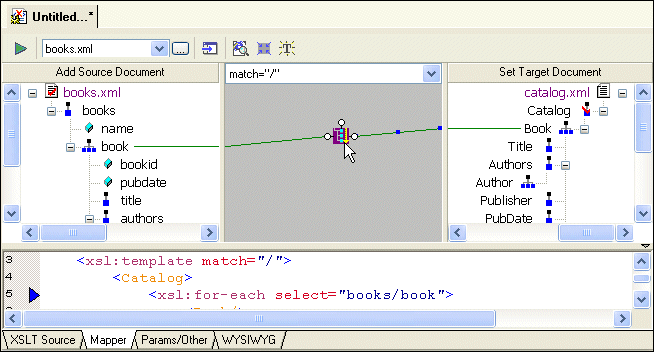
3. Press and hold the left mouse button, and drag from
book to the
Book repeating element in
catalog.xml.
Stylus Studio draws a line as you drag.
4. Release the mouse button to create the link between
book and
Book.
Stylus Studio creates an
Also notice that the complete
The template contains an
5. Click the
Params/Other tab.
In the Output method: field, display the drop-down list and click xml. Note, however, that the output of a stylesheet generated by the XSLT Mapper is always XML - even if the setting for Output method is unspecified, Stylus Studio still generates XML.
6. Click the
Mapper tab.
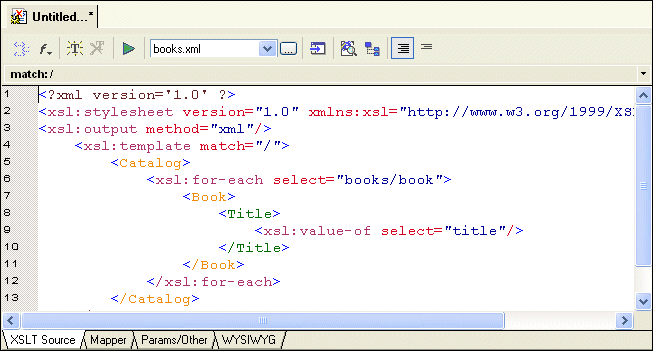
The xsl:output instruction is added to the XSLT source:
7. Create another link from the
title element to the
Title element.
8. Click the
XSLT Source tab to see the new instructions in the template. (If you prefer, you can simply adjust the splitter between the XSLT source pane and the XSLT Mapper canvas.
For each link you define, Stylus Studio adds instructions to the template that matches the root node. In the XSLT you have composed so far, the XSLT inserts a
Why does the stylesheet extract the value of the
|

XML PRODUCTIVITY THROUGH INNOVATION ™