Updating a Sample Document Using the Grid Tab

This section provides instructions for updating the your-quotes.xml document using the Grid tab of the XML Editor. The Grid tab is useful for displaying structured data. It is a convenient way to view a document that contains multiple instances of the same type of element, for example.


The XML Editor Grid tab is available only in Stylus Studio XML Professional Edition.

To update XML document using the Grid tab:
1. If it is not already open, open your-quotes.xml.

See Opening a Sample XML Document if you need help with this step.

2. At the bottom of the XML Editor window, click the Grid tab.

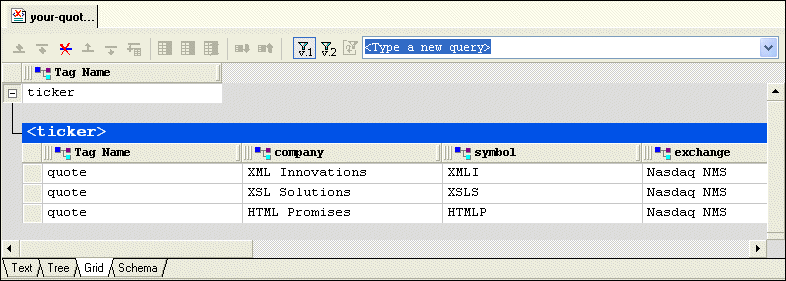
Stylus Studio displays a table that contains the XML data.

Figure 19. Grid Tab

The left most column, with the Tag Name heading, contains the children of the <ticker> element. The remaining columns contain the grandchildren of the <ticker> element. The heading of each column identifies the element name - company, symbol, and so on.

Tip


You can resize columns by dragging the handle on the column heading's right side. You can change the element order in the document by dragging the handle on the column heading's left side. Stylus Studio swaps positions with the column on which you come to rest.

3. Select the last row by clicking to the left of the last <quote> element.

The row is highlighted in blue.

4. Click the Insert row after ( ) button.

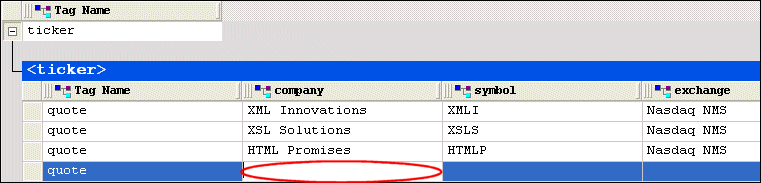
A new instance of the <quote> element is added to the document. The cursor is placed in the <company> element cell.

Figure 20. Grid with a New Row

5. Type XML Designs and press Enter.

Stylus Studio creates the value for the <company> subelement.

6. Press Tab (or use the right arrow key) to move the cursor to the next cell in the row.
7. Repeat step 5 and step 6 to create values for the <symbol> and <exchange> subelements.
8. If you want, you can continue to add the data contained in a quote element.

XQuery Integration

Learn how new XQuery technologies can simplify legacy data integration by leveraging industry standards, proven open-source XML processing components, and Stylus Studio's integrated XQuery & XML tools.

XML Programming

Simplify XML Programming with Stylus Studio's XML Pipeline, a powerful tool for modeling, programming, debugging and deploying complete XML programs.

Apache FOP

Apache FOP is an open-source engine is available from the Apache project that renders XSL-FO into PDF and other popular document formats. Apache FOP is fully integrated with Stylus Studio's XSL:FO tools.

SQL/XML Tutorial

Many developers need to be able to write applications that work for databases from multiple vendors. This SQL/XML Tutorial refers to SQL/XML, XQuery, and Native XML Programming Languages to do just that.

Stylus Most Wanted

 
Free Stylus Studio XML Training:
W3C Member