Opening a DB-to-XML Data Source

You can open a DB-to-XML data source in one of two ways:

  • As a DB-to-XML data source, in the DB-to-XML data source editor. This gives you the opportunity to make changes to the data source as you originally defined it, including its connectivity settings and SQL/XML statements, for example.
  • As XML, using any Stylus Studio editor that accepts XML (such as the XML editor, for example). When you open a DB-to-XML data source as XM L, Stylus Studio displays only the XML that resulted from executing the SQL/XML defined on the SELECT tab.
To open a DB-to-XML data source:
1. Select File > Open from the menu bar.

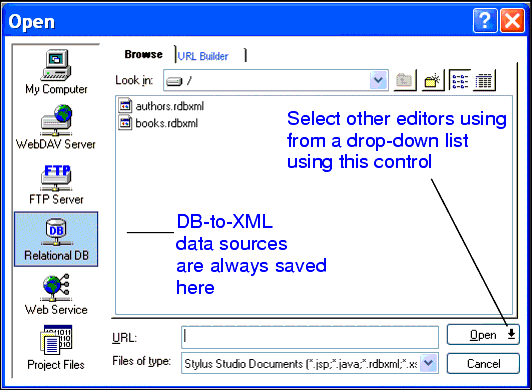
Stylus Studio displays the Open dialog box.

Figure 276. Open Dialog Box

2. Click the Relational DB icon to display the files in the DB-to-XML file system.
3. Select the file you want to open.
4. If you want to open the file in the DB-to-XML data source editor, click Open.

To open the file in the XML editor:

a. Click the down arrow on the Open button.
b. Select XML Editor from the drop-down list.

Stylus Studio opens the file in the editor you selected.

Note


When you save a DB-to-XML data source that you have opened as XML, any SQL/XML statements you have defined on the UPDATE tab are executed.

Web Service Servers

Stylus Studio's Web Services tools support development and testing of Web service applications on the industry's leading Web Service Servers including Apache AXIS, Mirosoft SOAP Client Toolkit and Microsoft .NET Server.

Industry DTD Standards Support (OASIS)

Stylus Studio provides integrated support OASIS catalogs, including thousands of industry-standard DTDs like DocBook, FIXML, and more!

Web Service Data-to-XML Mapper

Stylus Studio provides a powerful standards-based solution for accessing and transforming live Web service XML data. Intuitive tools like the Web Service Call Composer and UDDI Browser make developing Web service applications a snap.

SQL Server Tools

Integrated SQL Server Tools in Stylus Studio enable you to access relational data stored in SQL Server 2000 or SQL Server 2005 as XML using XQuery, SQL/XML or ADO - learn how to export relational data as XML today!

Stylus Most Wanted

 
Free Stylus Studio XML Training:
W3C Member