|
|
Home > Online Product Documentation > Table of Contents > Manually Entering SQL/XML Manually Entering SQL/XML
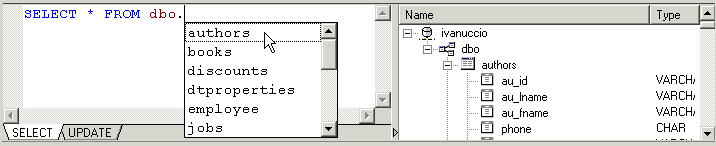
When you type a qualified name in the
SELECT or
UPDATE tabs of the editor, Stylus Studio's auto-completion feature displays a list of valid names. For example, when you type the period in this statement,
To finish the statement, select the object name from the drop-down list and press Enter (or just double-click). |

XQuery API for Java (XQJ)
DataDirect XQuery is an embeddable software product based on the XQuery and XQJ standards that enables Java developers to access both relational and XML data sources using a single XQuery query. Runs on Oracle, SQL Server, DB2, and more!
Open XSLT Architecture
Learn how Stylus Studio's Open XSLT Architecture enables you to use any of the popular industry-standard XSLT processors (like Saxon, Xalan-J, MSXML, Microsoft .NET, and others) for all your XSLT development tasks.
XML Differencing
Stylus Studio's integrated XML Differencing tool visually computes and analyzes any changes made to files or folders in a highly configurable, XML-aware fashion. Display text or tree views, with changes displayed in a merged view or side-by-side!
Building Web Services With Stylus Studio
This video demonstration shows you how to use Stylus Studio's Web Service call composer to locate a WSDL file on the Internet, inspect, create SOAP envelope, invoke and inspect Web service data.