|
|
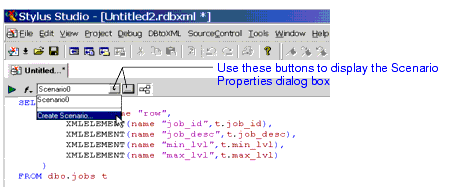
Home > Online Product Documentation > Table of Contents > Opening the Scenario Properties Dialog Box Opening the Scenario Properties Dialog BoxThere are two ways to open the Scenario Properties dialog box. Both allow you to work on existing scenarios or to create new ones. To open the Scenario Properties dialog box:
|

DTD Parser
Learn about the powerful DTD parser technologies that are supported in Stylus Studio's DTD tools, including DOM and SAX based DTD parsing components.
XQuery Profiler
Stylus Studio's XQuery Profiler allows you to benchmark any XQuery expression, and it helps you locate and eliminate performance bottlenecks for maximum XQuery performance.
Using DataDirect XML Converters
Learn how to use DataDirect XML Converters and the Stylus Studio Java Code Generator to deploy the XQuery applications you build in Stylus Studio to a live server environment.
Validating EDIFACT Documents with XML Schemas
Either before or after transforming EDIFACT content, generated XML Schemas will make sure that we have all of the necessary components, our codes are all according to the standard codelists, and every little delimiter is in the right place.