|
|
Home > Online Product Documentation > Table of Contents > Using the Server URL Field Using the Server URL FieldYou use the Server URL field to identify the server hosting the database to which you want to connect, the port to use, and any other required or optional parameters. For example, the string used to connect to a Microsoft SQL Server database might look like this:
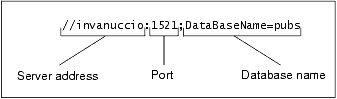
The specific syntax of the string you enter in the Server URL field varies based on database type. Consult your database documentation for information regarding connectivity syntax and optional parameters.
|

Java IDE
Edit, compile and debug and generate Java code with Stylus Studio's Java Integrated Development Environment (IDE). Supports popular Java XML processing components including Apache Xalan, Apache Axis, Apache Xerces, Saxon and more.
EAI - Enterprise Application Integration
Using EAI tools included with Stylus Studio it's easy to unlock silos of enterprise data and seamlessly integrate it into your IT applications.
Electronic Data Interchange (EDI) Blog
The EDI-L Blog is the best technical forum for discussing topics related to Electronic Data Interchange (EDI), including EDIFACT, and X12 Technologies. Topics include EDI Software, EDI Standards, EDI applications, EDI examples, and more.
XML Schema Quality Checker
Use IBM's alphaWorks XML Schema Quality Checker to check the quality and style of your XML schema documents. Fully integrated with the Stylus Studio XML Schema Editor and XML validator.


