Using Converters in Stylus Studio

Once you have created a Convert to XML converter ( .conv), you can use it to open any file (of the type you used to define it) as XML anywhere in Stylus Studio. For example, you might want to use a text file ( .txt) as the source document for XQuery Mapper. When you open a file using a converter, the Convert to XML adapter engine converts that file to XML on-the-fly, using the settings defined in the converter you select.

To open a file using a Convert to XML converter (.conv file):
1. Display the Open dialog box (select File > Open from the Stylus Studio menu, for example).
2. Navigate to the directory that contains the file you want to open using the converter and select the file.
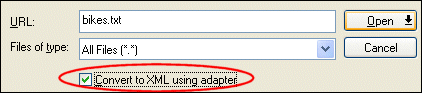
3. Check the Convert to XML using adapter check box and click the Open button.

Figure 157. Check Box to Open Files Using Converter

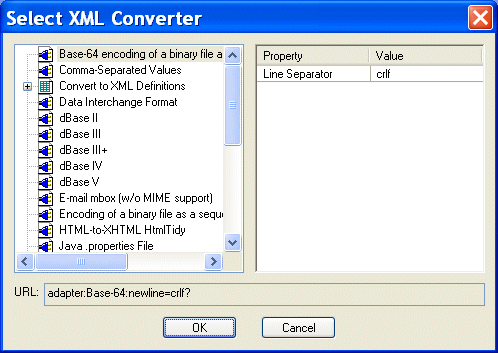
Stylus Studio displays the Select XML Converter dialog box.

Figure 158. Select XML Converter Dialog Box

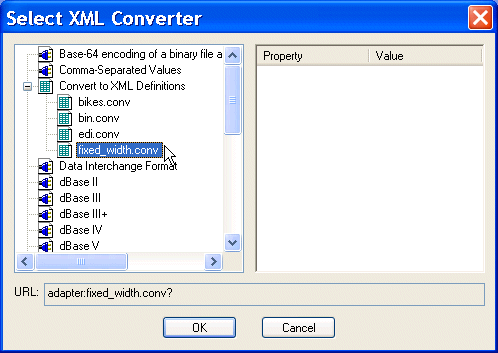
4. Expand the Convert to XML Definitions tree and select the converter you want to use to convert the file you selected in step 2 to XML.

Figure 159. Selecting a Convert to XML Converter

5. Click OK.

The file is converted to XML and appears in the editor from which you displayed the Open dialog box in step 1.

XML Validator

Stylus Studio has a built-in XML validator that supports industry-standard DTD and XML Schema validators including MSXML 4.0 SAX, MSXML 4.0 DOM, Microsoft .NET XML Parser (System.XML), Xerces-J 2.5.1, XSV 2.6, etc. Validate XML with Stylus Studio.

Investments and Financial Companies That Use Stylus Studio

Stylus Studio provides XML tools & components to leading investment and financial companies! See which top investment and financial companies are banking on Stylus Studio 2006 to simplify their dollars and cents.

XML Syntax Help - Intelligent XML Editing

Stylus Studio's XML Editors feature Intelligent XML Schema/DTD-Aware Code Sensing and context sensitive XML code auto-completion. Simplify XML editing with Stylus Studio today.

Simple API for XML (SAX)

SAX stands for Simple API for XML - SAX is an XML standard used everywhere in Stylus Studio, for parsing and building representations of XML documents.

Stylus Most Wanted

 
Free Stylus Studio XML Training:
W3C Member