|
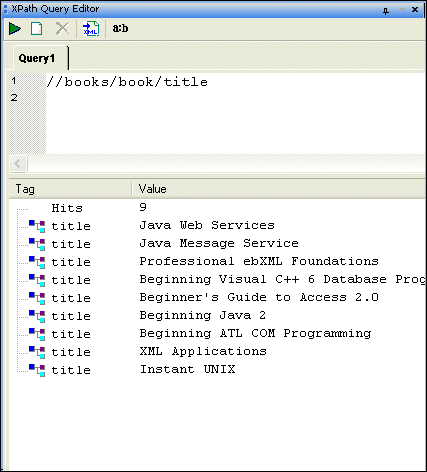
Home >Online Product Documentation >Table of Contents >Working with Query Results Working with Query ResultsQuery results are shown in the XPath Query Editor in the results pane as a number of hits and include the type of XML tag and value of each hit, as shown here. When you click on a result node, Stylus Studio's back-mapping feature highlights the line in the XML document that supplied the value for the result node you selected. Opening Query Results as a New Document
After you have executed a query, you can optionally choose to display the query result in a new XML document. If the result contains only elements, Stylus Studio creates a root element (named < To open a query result as an XML document:Execute the query, and then Alternative: |

XQuery Talk
Join the XQuery Talk mailing list for a practical discussion about XQuery. It's a place to work together to learn a new language, talk about problem solutions, discuss engines and implementations, chat about the latest XQuery news and more.
XML Operations
Using XML Pipeline it's easy to visually specify a series of XML operations to apply on your XML data, including parsing, validating, converting and transforming, according to the needs of your business application.
Hotels, Casinos & Resorts That Use Stylus Studio
What's more romantic than a vacation for two and the world's best XML IDE at your finger tips? Nothing, that's why these hotels, casinos, & resorts are using Stylus Studio to help you get on your dream vacation.
Using Stylus Studio's Database-to-XML Editor to Query and Update Relational Databases using SQL/XML
Watch and learn how easy it is to define relational-to-XML mappings for getting XML out of relational databases and updating databases from XML using industry-standard SQL/XML extensions and Stylus Studio's DB-to-XML data-source editor.