Cart
Cart
|
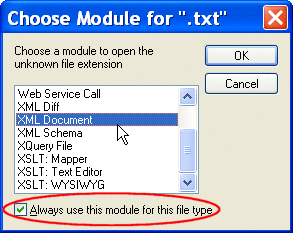
Home >Online Product Documentation >Table of Contents >Types of Files Recognized by Stylus Studio Types of Files Recognized by Stylus StudioStylus Studio recognizes over ten types of files by default. Each file is associated with a Stylus Studio module, or editor, appropriate for its type, as shown in the following table. You can add your own file types to this list, specify the module you want them opened in, and, optionally, specify Stylus Studio as the default application for viewing and editing files of that type. See Adding File Types to Stylus Studio. Opening Unknown File TypesWhen you try to open a file of a type that is not recognized by Stylus Studio, Stylus Studio displays the Choose Modulefor dialog box, which allows you to specify the module or editor you want to use to open the file. When you respond to this dialog box, you can optionally indicate whether you want all files of that type to be associated with the Stylus Studio module you select in the future. File types you associate with a Stylus Studio module are added to the File Types page of the Options dialog box. You can remove or change the module association at any time. See Adding File Types to Stylus Studio for more information. Opening Files Stored on Third-Party File SystemsStylus Studio provides access XML documents stored on third-party file systems like Raining Data® TigerLogic® XML Data Management Server (TigerLogic XDMS). See Chapter 16Integrating with Third-Party File Systems for more information. Modifications to Open FilesIf a file that is open in Stylus Studio is modified (changed, and saved) outside Stylus Studio, Stylus Studio alerts you that the file has been changed and gives you the chance to reload it. |

XML PRODUCTIVITY THROUGH INNOVATION ™