Cart
Cart
|
Home >Online Product Documentation >Table of Contents >Using XML Converters to Open a Non-XML File as XML Using XML Converters to Open a Non-XML File as XMLTo open a non-XML file as XML using XML Converters:
1. Select File > Open from the Stylus Studio menu.
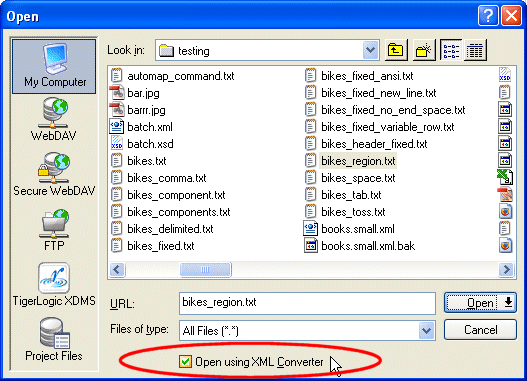
Stylus Studio displays the Open dialog box.
2. Navigate the file system that contains the file you want to open as XML. If necessary, change the value in the Files of type field to filter the files that are displayed.
3. Select the Open using XML Converters check box.
4. Click the Open button.
Stylus Studio displays the Select XML Converter dialog box. (See Figure 145.)
5. Select the XML Converters you want to use to convert your non-XML file to XML.
6. Optionally, change the default values of the conversion properties to be used when converting your file. See Chapter 4, XML Converters Properties, in the DataDirect XML Converters User's Guide and Reference if you need help with this step: http://www.xmlconverters.com/doc/.
7. Click OK.
Stylus Studio converts the file you specified in step 2 to XML using the DataDirect XML Converters you selected in step 5. The file is displayed in a new instance of the XML Editor. |

XML PRODUCTIVITY THROUGH INNOVATION ™