|
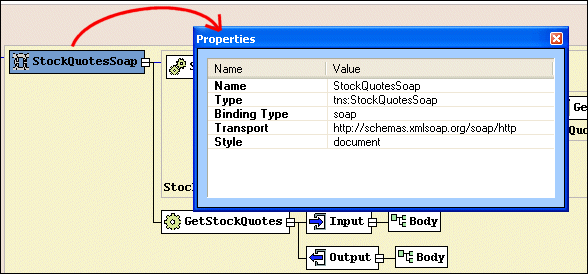
Home >Online Product Documentation >Table of Contents >Properties Window Properties WindowYou use the Properties window to set values for WSDL elements. Not all element values can be set using the diagram pane - the Binding element's transport type, for example. You can write the necessary XML by hand in the text pane if you choose, but it can be easier, faster, and less error-prone to set these values using the drop-down lists for Values fields in the Properties window. |

Oil, Gas & Electric Companies That Use Stylus Studio
Oil, gas & electric companies know a good resource when they see it. That's why they use Stylus Studio as their #1 XML resource. Come see which of these top oil, gas & electric companies are conserving their time and labor with Stylus Studio.
Convert EDIFACT to XML Schema
Convert EDIFACT to XML with Stylus Studio's XML Schema and legacy data integration tools.
XPath Editor
Stylus Studio's intelligent code-sensing, auto-completion technology, Sense:X, is XPath-aware. You'll find Sense:X for XPath in all of Stylus Studio's editors, including the XML Editor, XSLT Editor, and XQuery Editor.
XML Schema Documentation Generator
Stylus Studio's XML Schema Editor includes an integrated XML Schema documentation generator, allowing you to easily publish XML content models defined in XML Schema in a convenient, HTML format. A screenshon of the XML Schema Editor is shown here.