|
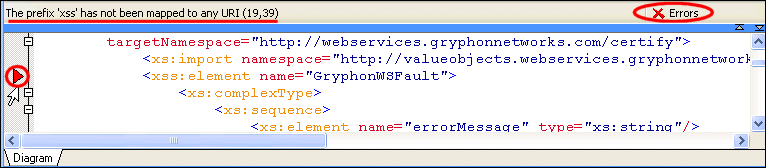
Home >Online Product Documentation >Table of Contents >Error Detection Error DetectionStylus Studio flags any WSDL or XML Schema errors in the text pane - lines that contain errors are identified with a red triangle, and the type and location of the error is displayed in the status area at the top of the text pane, as shown here: When you click the error message, Stylus Studio jumps to that part of the WSDL document containing the error. When you correct one error, information about the next error detected by Stylus Studio (if any) is displayed in the status area. |

XQuery Mapper
Stylus Studio has the industry's only XQuery mapper, enabling you to develop sophisticated XML mappings consisting of queries and data transformation in an intuitive, visual manner.
Technology Companies That Use Stylus Studio
Technology companies can't always handle every technology that they come across. That's why when it comes to XML, they look to Stylus Studio to guide them. Check out which top technology companies are looking to the future with Stylus Studio.
XML to PDF
Convert XML to PDF using Stylus Studio's XML publishing tools - the easiest way to design beautiful document layouts for use in XSL:FO based multi-channel publishing and single source publishing applications.
Chemical Companies That Use Stylus Studio
When working in a lab it's always important to have the right ingredients. That's why top chemical companies use Stylus Studio 2006 to create the ultimate experiments. See which of these top chemical companies are using Stylus Studio today!