Cart
Cart|
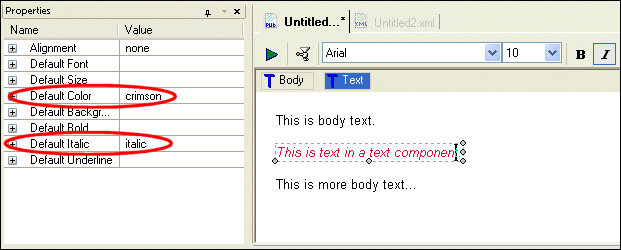
Home >Online Product Documentation >Table of Contents >Text TextA text component is a block that allows you to create an area for text that can be formatted independently from the body text in a report. The text component in Figure 465 has been formatted using a crimson italic font, which differs from the default body text that precedes and follows it. Text components and body text have the same properties (Alignment, Font, Color, Size, and so on). Creating a Text ComponentTo create a text component:
1. Click the canvas where you want to insert the text component.
2. Select Report > Insert > Text from the menu.
Alternative: Right-click and select Insert Text from the short-cut menu. Graphical RepresentationIn the XML Publisher canvas, a text component is represented, when selected, as a bounding box drawn with a dashed line. If the text component is not selected, the bounding box does not appear. |

XML PRODUCTIVITY THROUGH INNOVATION ™