|
|
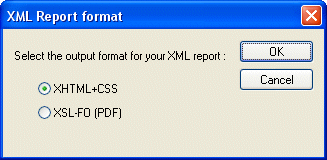
Home >Online Product Documentation >Table of Contents >Choosing a Report Format Choosing a Report FormatWhen you create an XML Report in Stylus Studio, you need to specify the format you want for the finished report - HTML (XHTML+CSS) or PDF (XSL-FO). Stylus Studio can generate XQuery or XSLT code for either format. You specify report format using the XML Report Format dialog box, which appears when you create a new XML Report in Stylus Studio: Specifying a format up front allows Stylus Studio to use format information to expose format-specific properties - like headers and footers for reports in PDF, for example - to help speed and simplify report creation. |

Airlines, Aerospace and Defense
Want to know what airlines, aerospace and defense companies are soaring high with Stylus Studio 2006? Well now you can! Come check out these leading companies and soar with Stylus Studio 2006 yourself.
XML Document Wizards
Stylus Studio XML Document Wizards help you easily convert EDI, flat files, and other document formats to industry-standard XML.
XML Schema Tutorial
An XML Schema Tutorial that explores real-world XML Schema development issues, XML Schema examples and various use cases.
XML Unicode Encoding
Stylus Studio supports over 300 different file encodings, including UTF-8, UTF-16, EUC-JP, SHIFT-JIS, and more, alowing you to work with any XML document. Robust text editors support standard editing features, and Sense:X intelligent auto-completion.