Home >Online Product Documentation >Table of Contents >Code Generation Settings
Code Generation Settings
When you generate code for an XML pipeline, Stylus Studio displays a dialog box that allows you to specify settings that affect the generated code. There are separate dialog boxes for Java and C# code. The dialog box that appears is based on the execution framework you selected for the XML pipeline.
Java Code Generation Settings
|
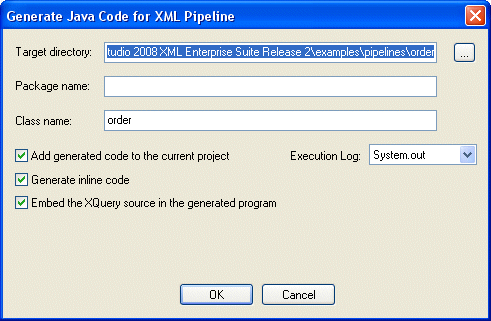
Figure 428. Generate Java Code for XML Pipeline Dialog Box
You use Generate Java Code for XML Pipeline dialog box to specify
- The target directory in which you want the Java code created.
c:\temp\myPipelineJavaCode, for example. If the directory you name does not exist, Stylus Studio creates it when you run the Java Code Generation wizard. The default is . , which places the generated code in the same directory as the .pipeline file. - Optionally, a package name. If you specify a package name, Stylus Studio uses this name to create a subfolder in the target directory you specify. If you specify mypackage as the package name, for example, the generated code is written to
c:\temp\myPipelineJavaCode\mypackage. (Though optional, it is considered good practice to create a package name.) - The class name. Stylus Studio also uses the class name for the
.java file created by the Java Code Generation wizard. For example, if you provide the name MyClass, Stylus Studio creates c:\temp\myPipelineJavaCode\mypackage\MyClass.java. - Whether or not you want to add the generated code to the current project.
- Whether or not you want to write an execution log file when the Java class runs.
- Whether or not you want to generate inline code. Inline code can be run anywhere, as-is. If you choose not to generate inline code, you must ensure that the XML Pipeline Java libraries,
xmlpipeline. jar, is in your system's classpath. - Whether or not you want to embed the XQuery source in the generated Java code. This option is available when using either the Saxon XQuery or DataDirect XQuery processors. This option is available only if the Generate inline code check box is selected.
All of these options are selected by default.
C# Code Generation Settings
|
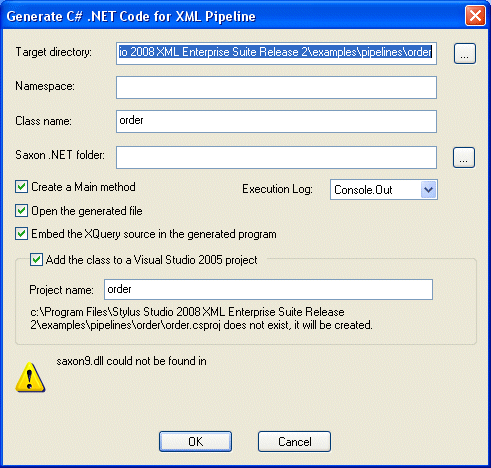
Figure 429. Generate C# .NET Code for XML Pipeline Dialog Box
You use Generate C# .NET Code for XML Pipeline dialog box to specify
- The target directory in which you want the C# code created.
c:\temp\myPipelineC#Code, for example. If the directory you name does not exist, Stylus Studio creates it when you run the Code Generation wizard. The default is the same directory as the .pipeline file. - Optionally, a namespace name. Stylus Studio uses the namespace name to create a subfolder in the target directory you specify. If you use myNamespace, for example, the generated code is written to
c:\temp\myPipelineC#Code\myNamespace. (Though optional, it is considered good practice to create a namespace.) - The class name. Stylus Studio uses the class name for the
.cs file created by the Code Generation wizard. For example, if you provide the name myClass, Stylus Studio creates c:\temp\myPipelineC#Code\myClass.cs. Stylus Studio uses the XML pipeline name as the default class name. - The location of Saxon .NET on your system. Stylus Studio adds this URL to the Microsoft Visual Studio 2005 project, allowing the generated C# code for .NET to compile.
- Whether or not you want the resulting
.cs file to contain a static void Main(String
[ ] args) method. - The argument for the
setExecutionLog method in the generated application. Choices are Console.out (the default), Console.err, and Quiet. Set to Quiet to turn off the log. - Whether or not you want to open the generated code file.
- Whether or not you want to embed the XQuery source in the generated C# code. This option is available when using either the Saxon XQuery or DataDirect XQuery processors. This option is available only if the Generate inline code check box is selected.
- Whether or not you want to either create a new Visual Studio 2005 project or update an existing one. If a new project is created, it is automatically opened with whatever application is registered to open
.csproj files. The .csproj file contains all the necessary references to the generated .cs file, as well as all the .dll files that the .cs file requires.
To run the .cs file, simply press Ctrl+F5 in Visual Studio.
 Cart
Cart