Cart
Cart|
Home >Online Product Documentation >Table of Contents >Setting and Removing Breakpoints Setting and Removing BreakpointsYou can set breakpoints on any node in an XML pipeline. You cannot set breakpoints on a node's input and output ports. To set a breakpoint:
1. Select the XML pipeline node on which you wish to set the breakpoint.
2. Click the Toggle Breakpoint button (  ) or press F9.
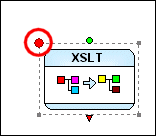
Stylus Studio displays a breakpoint symbol (a large red circle) next to the node. To remove a breakpoint:
1. Select the XML pipeline node whose breakpoint you wish to remove.
2. Click the Toggle Breakpoint button (
) or press F9.
|

XML PRODUCTIVITY THROUGH INNOVATION ™