Cart
Cart
|
Home > Online Product Documentation > Table of Contents > How to Generate Java Code for XSLT How to Generate Java Code for XSLTTo generate Java code for XSLT:
1.
Open the XSLT document for which you want to generate Java code.
2. Define at least one scenario for the XSLT document for which you want to generate Java code. The scenario must use the Saxon or Java built-in processor. See
<hyperlink>Scenario Properties Used for Generating Code for more information.
3. Select the scenario for which you want to generate Java code.
4. Close the
Scenario Properties dialog box.
5. Select
XSLT > Generate Java Code from the Stylus Studio menu.
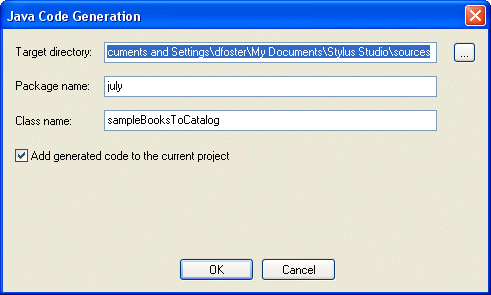
The Generate Java Code dialog box appears.
6. Specify the settings you want for the target directory, package and class names, and so on. See
<hyperlink>Java Code Generation Settings if you need help with this step.
7. Click
OK.
Stylus Studio generates Java code for the XSLT. When the code generation is complete, the resulting file (classname
|

XML PRODUCTIVITY THROUGH INNOVATION ™