What Is a Stylesheet?

A stylesheet is an XML document that contains instructions for generating a new document based on information in the source document. This can involve adding, removing, or rearranging nodes, as well as presenting the nodes in a new way.

This following topics provide more information:

Example of a Stylesheet

When you work with a stylesheet, three documents are involved:

  • XML source document
  • Result document, which can be HTML, XML, or text
  • XSL stylesheet, which is also an XML document

For example, suppose you have the following XML document:

<?xml version="1.0"?>
               
<bookstore>


<book>
                   
<author>W. Shakespeare</author>
                   
<title>Hamlet</title>
                   
<published>1997</published>
                   
<price>2.95</price>
                   
</book>
                   
<book>
                   
<author>W. Shakespeare</author>
                   
<title>Macbeth</title>
                   
<published>1989</published>
                   
<price>9.95</price>
                   
</book>
                   
<book>
                   
<author>D. Alighieri</author>
                   
<title>The Divine Comedy</title>
                   
<published>1321</published>
                   
<price>5.95</price>
                   
</book>


</bookstore>

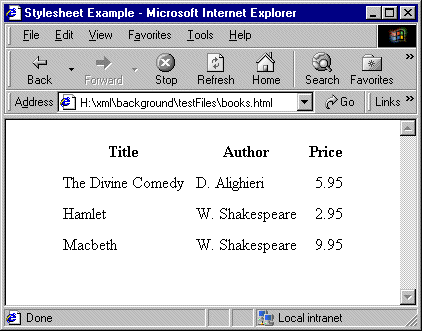
You can use a stylesheet to transform this XML document into an HTML document that appears as follows in a Web browser:

Figure 191. Example of Transformed XML

The Web page in Figure 191 is defined by the following HTML document:

<html> <head> <title>Stylesheet Example</title> </head>
               
<body> <table align="center" cellpadding="5">
               
<tr><th>Title</th><th>Author</th><th>Price</th></tr>
               
<tr><td>The Divine Comedy</td><td>D. Alighieri</td>


<td align="right">5.95</td></tr>


<tr><td>Hamlet</td><td>W. Shakespeare</td>
<td align="right">2.95</td></tr>


<tr><td>Macbeth</td><td>W. Shakespeare</td>
<td align="right">9.95</td></tr>


</table> </body> </html>

The HTML document contains HTML markup that is not in the source document. In the HTML document, the data from the source document is not in the same order as it is in the XML source document. Also, this HTML document does not include some data that is in the XML source document. Specifically, the HTML document does not include information about the date of publication (the published elements).

To create this HTML file, the stylesheet contains two templates that provide instructions for

  • Adding a table with a heading row
  • Wrapping the contents of the title, author, and price elements in table cells

Following is a stylesheet that does this.

<?xml version = "1.0">
               
<xsl:stylesheet xmlns:xsl=
               
	"
              http://www.w3.org/1999/XSL/Transform"
               

              	version="1.0">
               
<xsl:output method="html"/>
               
<xsl:template match="/">
               
	<html> <head>
               
	<title>Stylesheet Example</title></head>
               
	<body>
               
	<table align="center" cellpadding="5">
               
	<tr>
               
	<th>Title</th>
               
	<th>Author</th>
               
	<th>Price</th></tr>
               
	<xsl:apply-templates 
               
		select="/bookstore/book">
               
		<xsl:sort select="author"/>
               
	</xsl:apply-templates>
               
	</table>
               
	</body>
               
	</html>
               
</xsl:template>
               
<xsl:template match="book">
               
	<tr>
               
	<td><xsl:value-of select="title"/></td>
               
	<td><xsl:value-of select="author"/></td>
               
	<td align="right">
               
		<xsl:value-of select="price"/>
               
	</td>
               
	</tr>
               
</xsl:template>
               
</xsl:stylesheet>


About Stylesheet Contents

Stylesheets are XML documents. They contain a combination of

Each XSLT element is an instruction to the XSLT processor. For information about all XSLT instructions, see XSLT Instructions Quick Reference.

  • Non-XSLT elements and attributes. In the previous stylesheet, these include the HTML elements that create the table.

The root element of a stylesheet must declare a namespace that associates a prefix with the URI for an XSLT processor. The URI in the namespace declaration in the previous example identifies the W3C standard XSLT processor. This declaration, shown again below, instructs the XSLT processor to recognize the XSLT elements and attributes by their xsl prefix:

xmlns:xsl="
              http://www.w3.org/1999/XSL/Transform"


In this stylesheet, you must use the xsl prefix for all XSLT instructions.

Note


The Stylus Studio XSLT processor requires the namespace URI to be http://www.w3.org/1999/XSL/Transform. The prefix can be anything you want. Typically, it is xsl.

When you write a stylesheet, you specify the actions you want the XSLT processor to perform when it processes a particular source node. To do this, you define XSLT templates, which are described in the next section.

Consumer Food Products

Want to know what special ingredient is in these consumer food product companies work enviornment? Well it's a touch Stylus Studio that give these consumer food product companies the extra edge they need for producing such high quality food products!

Berkeley DB XML and Stylus Studio

Develop XML applications for Berkeley DBXML with Stylus Studio integrated tools support for SleepyCat Software's DBXML. Open, Query and Save XML to and from Berkeley DB XML directly from within the Stylus Studio XML IDE.

Database-to-XML Mapping

Stylus Studio features several database-to-XML mapping tools that allow you to easily query a relational database using SQL/XML or SQL and render the results as XML. Stylus Studio also supports the world's first and only visual SQL/XML Editor!

ZapThink Report: Using Stylus Studio to Deploy XML Data Services

A Zapthink analyst discusses how to create the next generation of XML data services using Stylus Studio XML tools - Download the special report today for free.

Stylus Most Wanted

Site Map | Privacy Policy | Terms of Use | Trademarks
Free Stylus Studio XML Training:
W3C Member
Stylus Studio® and DataDirect XQuery™are products from DataDirect Technologies, is a registered trademark of Progress Software Corporation, in the U.S. and other countries. © 2004-2007 All Rights Reserved.