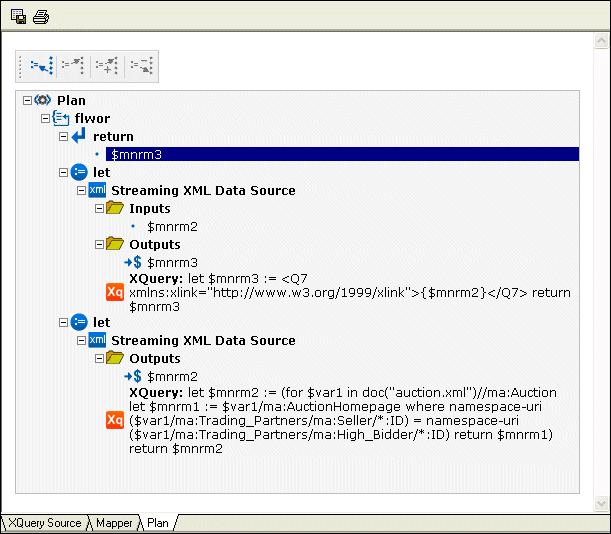
Example of a Query Plan

The example query plan shown in Figure 331 provides information about how DataDirect XQuery translates the following query, which accesses one relational data source, into a SQL Select statement and how XML results are constructed.

declare option ddtek:plan-explain 'format=xhtml';
               
<myHoldings> {
               
for $holdings in collection("pubs.dbo.holdings")/holdings
               
where $holdings/userid = "Minollo"
               
return <holding
               
quantity="{$holdings/shares}">{$holdings/stockticker/text()}</holding>
               
}
               
</myHoldings>


In the following query plan, notice how the Relational Data Source node includes details about the SQL Select statement, as well as information about how the result ( $PT) is constructed.

Figure 331. Example of a Query Plan Displayed in the XQuery Editor

Microsoft .NET XML Tools for System.XML 1.0 and System.XML 2.0

Stylus Studio features integrated XML validation, XSLT transformation and XSLT debugging using the official Microsoft .NET XML processing components: System.XML 1.0 and System.XML 2.0.

Translating X12 Documents to XML

The X12 to XML Converter is a built-in function of the adapter library. The XML that is generated is well commented and indented, and can be used anywhere XML is normally used — with XML Schemas, XSLT, XQuery, etc.

Technology Companies That Use Stylus Studio

Technology companies can't always handle every technology that they come across. That's why when it comes to XML, they look to Stylus Studio to guide them. Check out which top technology companies are looking to the future with Stylus Studio.

Building DataDirect XML Converter Applications with Stylus Studio

DataDirect XML Converters are Java and .NET components that enable access to any data (flat files, EDI) from your application code. Learn how to deploy XML applications today.

Stylus Most Wanted

 
Free Stylus Studio XML Training:
W3C Member