Other Ways to Register a Database Configuration

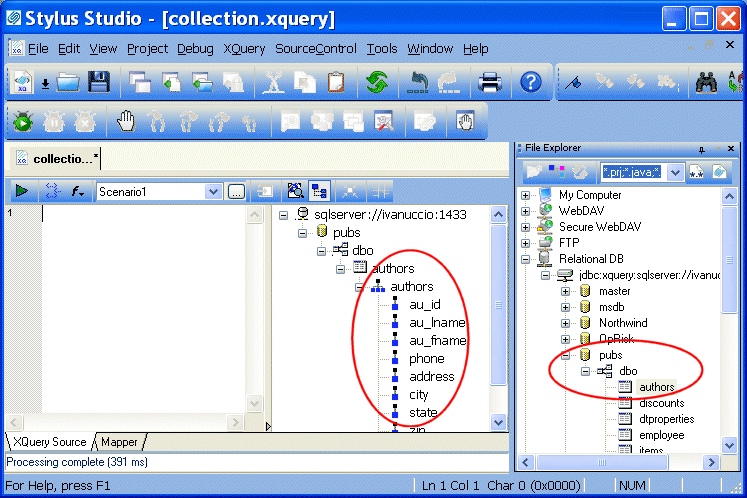
If you choose, you can explicitly register a database connection by dropping any elements from a database connection displayed in the File Explorer window (the connection representation, database, schema, table, or view) on the schema pane of the XQuery Source tab. You might want to do this when you want to view a table's or view's columns prior to writing your XQuery code, so you can see what data structures are available, as shown here:

Figure 327. Schema Pane Shows Table and View Columns

This also gives you the ability to close the File Explorer window after creating your database connection - providing more room to work, and simplifying the Stylus Studio desktop display.

Tip


You can also gain access to column-level information about a database's tables and views directly from the File Explorer window by selecting Read Structure from the table or view shortcut menu (right-click).

Choosing a Database Object

You can register a database connection by dragging any database object from the File Explorer window. The object you select affects which objects you can then query in your XQuery code:

  • Server - all of the server's databases and their child tables and views can be queried
  • Database - all of the database's tablespaces and their child tables and views can be queried
  • Tablespace - any of the tablespace's tables or views can be queried
  • Table/View - only the table or view can be queried
  • Column - only the column can be queried

Once you register a database connection to the XQuery document, the configuration information remains associated with the XQuery document until you explicitly delete it from the schema pane in the XQuery Editor.

Java Web Services

Stylus Studio's Web Service Call Composer simplifies Java Web Service development by making it easy to find, invoke, and test any Java Web Service deployed on any popular Java Web Service framework, such as Apache AXIS.

Join Us: Apply for a Job at Stylus Studio Today

Join our team of XML professionals and help us in our mission to create the most productive XML tools and components on the planet. Apply today!

Publishing & Printing

It is really hard to get things to look pretty, especially XML. That's why these publishing & printing companies use Stylus Studio to make a Mona Lisa out of data integration. Check out these top companies that are "stunning" with Stylus Studio!

Stylus Studio Lends a Helping Hand to the New Orleans Reconstruction Efforts

Read how Stylus Studio is helping with the on-going hurricane Katrina reconstruction efforts in New Orleans.

Stylus Most Wanted

Site Map | Privacy Policy | Terms of Use | Trademarks
Free Stylus Studio XML Training:
W3C Member
Stylus Studio® and DataDirect XQuery™are products from DataDirect Technologies, is a registered trademark of Progress Software Corporation, in the U.S. and other countries. © 2004-2007 All Rights Reserved.