 Cart
Cart
|
Home > Online Product Documentation > Table of Contents > Defining Elements That Carry Attributes and Contain Data in XML Schemas Defining Elements That Carry Attributes and Contain Data in XML Schemas
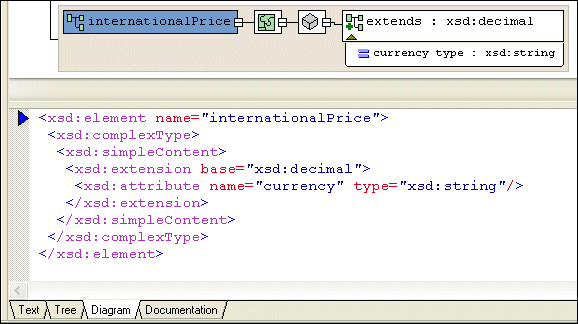
You might want to define an element that carries attributes and contains data, but does not contain subelements. In the
This element has a
Diagram ViewTo define a complex type that contains only attributes:
1. Right-click the
schema node
 .
.
2. In the shortcut menu, select
Add >
Element.
Alternatives: This operation is also available from the
XMLSchema >
Diagram >
Add > Element menu and from the
Add button
The new element is added to the XML Schema. It is displayed in the diagram and in the text pane (if you have it open). The properties for the new element are displayed in the Properties window.
3. Create a complexType of the element - right-click the element and select
Add > ComplexType.
4. Make sure the new complexType is selected.
5. Click the
QuickEdit button
 and select
Derive by extension or
Derive by restriction. These choices let you extend or restrict a base simpleType.
and select
Derive by extension or
Derive by restriction. These choices let you extend or restrict a base simpleType.
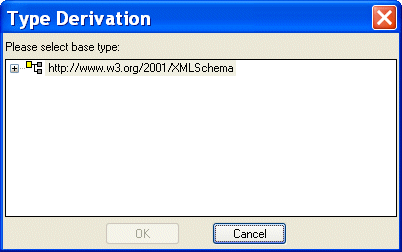
The Type Derivation dialog box appears.
6. Expand the W3C XML Schema and select the simpleType on which you want to base the data allowed by the complexType.
7. Click OK.
The XML Schema is updated with the element's new definition.
Figure 270 shows an extension of the
The simpleContent node (
8. To add an attribute, right-click the element and select
Add > Attribute.
Tree ViewTo define an element that contains raw data and carries attributes:
1. Click the
Schema node.
2. In the left tool bar, click
New Element Definition
 . In the
Tree view, Stylus Studio displays a field for the new element definition.
. In the
Tree view, Stylus Studio displays a field for the new element definition.
3. Type the name of the element and press Enter twice. If you press Enter once, Stylus Studio displays a pop-up menu that lists the possible types for the new element. You need to define a new type, so you cannot select from this list. If the pop-up menu does appear, press Enter or click outside the menu. You should now have a named element with no type specified.
4. In the left tool bar, click
New complexType
 . In the
Tree view, Stylus Studio displays a field for the new complexType.
. In the
Tree view, Stylus Studio displays a field for the new complexType.
5. In the left tool bar, click
New Content
 . Stylus Studio displays a drop-down list.
6. In the drop-down list that appears, double-click
simpleContent. This is the
Content Type property. When the content type is
simpleContent, the complexType you are defining can contain data and attributes. It cannot contain subelements.
7. If you want the contained data to be one of the simpleTypes already defined with no restrictions, click
New Extension
 in the left tool bar.
Stylus Studio displays a scrollable, drop-down list of the simpleTypes built in to XML Schema and previously defined in the current schema.
8. If you clicked
New Extension, double-click the type of the data you want this element to contain. Go to
step 9.
If you clicked New Restriction, follow these steps:
a. Double-click the simpleType whose values you want to restrict.
b. In the left tool bar, click
New Facet
 . Stylus Studio displays a pop-up menu.
c. Double-click the type of facet you want to specify.
d. In the
Properties window, double-click the
Value field.
e. Enter a value for the new facet.
f. To add another facet, click the
restriction node for the simpleType, and repeat
step b.
9. In the left tool bar, click the
complexType node that you created in
step 4.
10. In the left tool bar, click
New Attribute Definition
 . In the
Tree view, Stylus Studio displays a field for the new attribute definition.
. In the
Tree view, Stylus Studio displays a field for the new attribute definition.
11. Type a name for the new attribute and press Enter. Stylus Studio displays a scrollable, drop-down list of the possible types for the new attribute.
12. Double-click the attribute type. If you want to, specify a value for the attribute's
Default or
Fixed Value property in the
Properties window.
|

XML PRODUCTIVITY THROUGH INNOVATION ™
 .
.

 ) specifies that the complexType can contain only data and attributes. It cannot contain subelements.


