 Cart
Cart
|
Home > Online Product Documentation > Table of Contents > Inserting Contents in the HTML Editor Inserting Contents in the HTML EditorThe WYSIWYG tab provides an HTML editor that operates as you would expect. You can type text and select it to format it. The usual formatting tools appear in the WYSIWYG tool bar. Select the text you want to operate on and then click the tool that provides the feature you want.
Image Position
Image Position
|

XML PRODUCTIVITY THROUGH INNOVATION ™
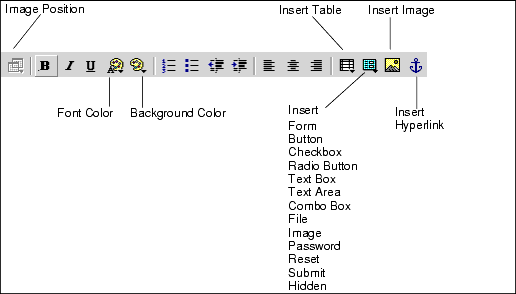
 allows you to specify whether the position of an image is fixed or dependent on the contents that come before it. Click the image for which you want to set this position attribute. Then click
Make Absolute if you want the image to always appear in the same location regardless of where the image is in the HTML source. You can also specify whether the image is movable. When
Movable is selected, you can move the image to a new location. The image always appears in the new location unless you explicitly move it again.
allows you to specify whether the position of an image is fixed or dependent on the contents that come before it. Click the image for which you want to set this position attribute. Then click
Make Absolute if you want the image to always appear in the same location regardless of where the image is in the HTML source. You can also specify whether the image is movable. When
Movable is selected, you can move the image to a new location. The image always appears in the new location unless you explicitly move it again.


