Descriptions of WYSIWYG Terms

The following terms are used to describe parts of the WYSIWYG tab:

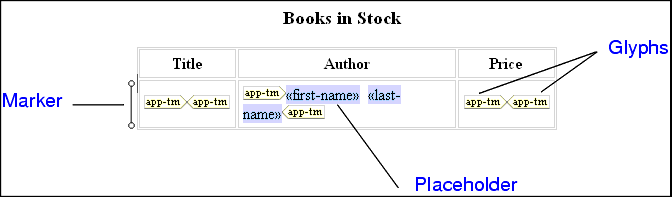
Figure 217. Parts of HTML Diagram in the WYSIWYG Tab

  • placeholder - an element or attribute name in double angle brackets. It represents dynamic text.
  • marker - a small image to the left of a placeholder or table row. Hold the cursor over a marker to see the XSLT instruction it represents and the context in which it operates.
  • glyphs - pairs of images that specify choose, if, or repeat. The corresponding XSLT instruction operates on the text represented by the enclosed placeholder or element.

To remove the glyphs, select the enclosed item, and right-click it to display a pop-up menu. Click Unwrap selected element.

Microsoft XML Tools

Build Microsoft XML applications with Stylus Studio, which includes development support for all Microsoft XML technologies, including MSXML and Microsoft System.XML (Microsoft XML Parsers), SQL Server 2000, SQL Server 2005 (Yukon), and more.

HTML Tidy

HTML Tidy is a program for turning HTML into something that can be parsed as XML, unlocking their data for use in XSLT and XQuery programs. Learn how to use HTML Tidy in Stylus Studio now.

Configuring the Java Runtime Engine or Java Development Kit

This page identifies the Stylus Studio modules that require Java runtime and Java compiler components, where you can download these Java components, and how to force Stylus Studio to detect new or changed Java components.

XML Project

Stylus Studio's Project Window is an intuitive, visual feature for organizing files belonging to a project. It supports different file-type icons and nested folders; many helpful options are available from the context menu.

Stylus Most Wanted

 
Free Stylus Studio XML Training:
W3C Member