Cart
Cart|
Home > Online Product Documentation > Table of Contents > Using DataDirect SequeLink as a DB-to-XML Data Source Using DataDirect SequeLink as a DB-to-XML Data SourceOnce you have configured DataDirect SequeLink to reference an ODBC system data source, you can use DataDirect SequeLink to create a DB-to-XML data source in Stylus Studio. The basic procedure is described here. For more information about how to create a DB-to-XML data source in Stylus Studio, see Creating a DB-to-XML Data Source. To use DataDirect SequeLink as a DB-to-XML data source:
1. Start Stylus Studio if it is not already running.
2. Click
File >
New >
DB to XML Data Source.
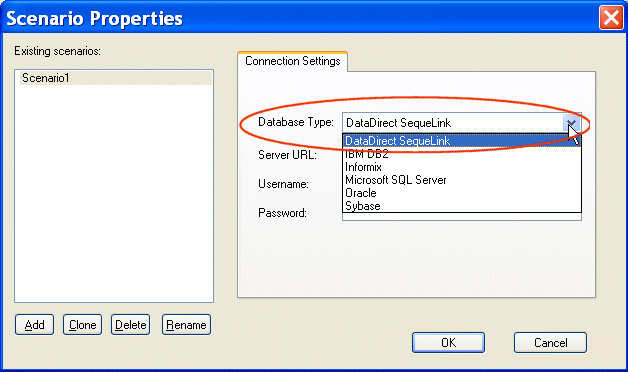
The Scenario Properties dialog box appears.
3. Select
DataDirect SequeLink from the
Database Type drop-down list.
Stylus Studio provides a default value for the Server URL field.
4. In the
Username and
Password fields, use the same values you used to connect to the DataDirect SequeLink service (
step 4 in the procedure described in
Configuring DataDirect SequeLink to Reference an ODBC System Data Source.
5. Click
OK.
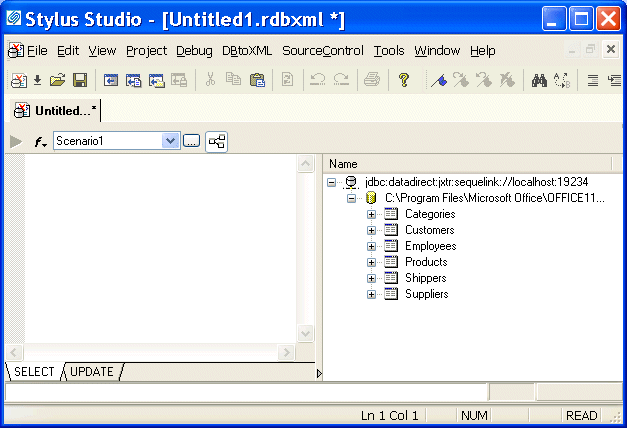
Stylus Studio connects to the ODBC system data source associated with the username and password you entered in step 4 and displays its tables and views, as shown in the following illustration.
6. Compose the SQL/XML you want to associate with this DB-to-XML data source as desribed in
Composing SQL/XML in Stylus Studio.
|

XML PRODUCTIVITY THROUGH INNOVATION ™