|
|
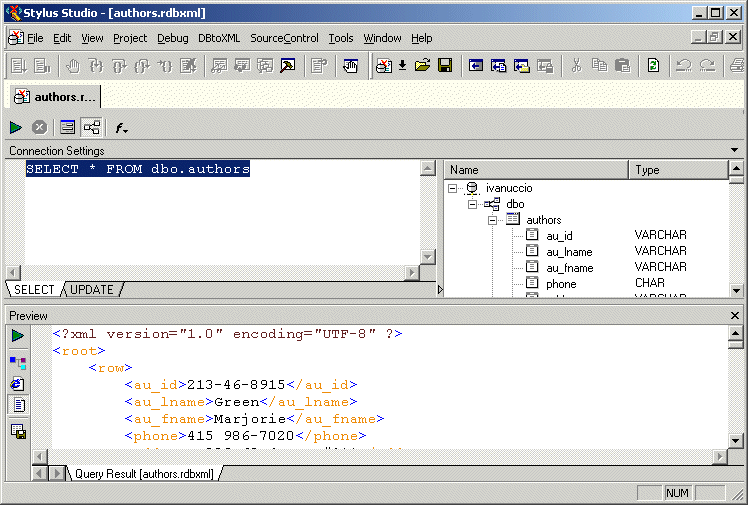
Home > Online Product Documentation > Table of Contents > Working with Relational Data as XML Working with Relational Data as XMLAs shown in the example in the preceding section, an SQL/XML query is returned as XML. The XML is displayed in the Preview window in the DB-to-XML data source editor, as shown in Figure 392.
You can work with an SQL/XML query result as XML and, optionally, update the relational database using changes to the XML file and the SQL/XML statements defined on the UPDATE tab of the DB-to-XML data source editor. |

Web Service Standards
Stylus Studio supports Web service standards including WSDL, UDDI and SOAP. The Web Service Tester lets you easily develop and leverage Web services in your XML applications.
XSL-List Blog
XSL-List is a discussion forum on the Extensible Stylesheet Language (XSL), covering the XSL specification, XSL processors, tools, user questions, trends and more. Bookmark this RSS or ATOM feed now!
Investments and Financial Companies That Use Stylus Studio
Stylus Studio provides XML tools & components to leading investment and financial companies! See which top investment and financial companies are banking on Stylus Studio 2006 to simplify their dollars and cents.
XML Syntax Help - Intelligent XML Editing
Stylus Studio's XML Editors feature Intelligent XML Schema/DTD-Aware Code Sensing and context sensitive XML code auto-completion. Simplify XML editing with Stylus Studio today.