|
Home > Online Product Documentation > Table of Contents > Creating a Template That Matches the book Element Creating a Template That Matches the book ElementThis topic is part of a sequence that starts with Creating a New Sample Stylesheet.
The template that matches the root node includes an
To define the template that matches the book element:
1. In the XSLT editor source document tree pane, expand the
bookstore element.
2. Double-click the
book element.
Stylus Studio creates a template that matches the
3. In the XSLT editor pane, add the following instructions to the new template's body:
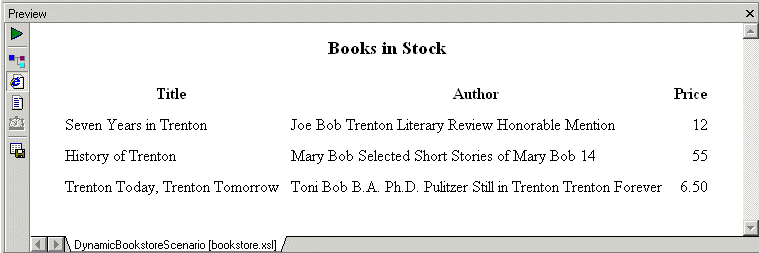
Press F5 to see the results. The result document looks like that shown in Figure 213:
In the
|

EDI to XML Mapping in Stylus Studio
Learn how to use Stylus Studio's EDI to XML mapping tools in Convert-to-XML, including loading an EDI file, inspecting application control codes, customizing XML output and other advanced EDI to XML mapping features.
XML Reports
Build beautiful XML reports from Relational, XML and Legacy Data. You XML report can be rendered in PDF or HTML using XSLT, XQuery or XSL:FO.
Whitepaper: FIXML - Working with Complex Message Sets Defined Using XML Schema
The advanced XML Schema handling and presentation capabilities of Stylus Studio have valuable implications for users of industry-specific XML message sets.
Using DataDirect XML Converters
Learn how to use DataDirect XML Converters and the Stylus Studio Java Code Generator to deploy the XQuery applications you build in Stylus Studio to a live server environment.