Setting Up Stylus Studio to Debug Sample Files

To set up Stylus Studio to debug sample files:
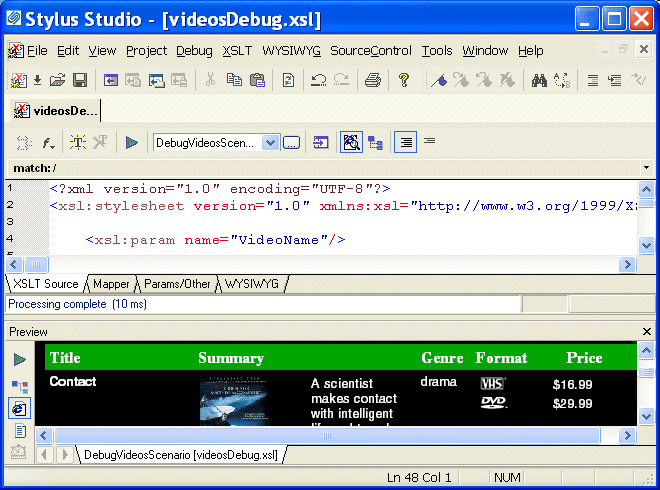
1. Open the videosDebug.xsl stylesheet, located in the examples\VideoCenter directory where Stylus Studio was installed.

Alternative: If the Stylus Studio Project window is open, you can access this stylesheet from the examples project.

Stylus Studio displays the videosDebug.xsl stylesheet in the XSLT editor.

2. In the XSLT editor tool bar, click Preview Result to run the predefined scenario DebugVideosScenario. The source XML document is videos.xml.

Stylus Studio applies the stylesheet and displays the results (a finished HTML page that displays information about a single video) in the Preview window.

Figure 53. Preview of videosDebug.xsl

XML Schema Validation

Validate XML using XML Schema with MSXML, XERCES, XSV, SYSTEM.XML, & other XSD Validators. Stylus Studio's XML Schema-Aware XML Editing makes XML Schema Validation a snap!

Introduction to Convert to XML

Convert to XML is Stylus Studio's all-purpose utility for getting legacy data integration of all sorts into a custom XML format. This video provides an overview of the tool and walks you through a sample CSV to XML data transformation project.

Educational Institutions That Use Stylus Studio

Education is the most powerful tool one can have. That's why these top education providers reach for Stylus Studio to educate their students and professors as well. See which education providers have the most powerful XML IDE in their classrooms!

Supported XML Technologies

Learning XML is easy with Stylus Studio, the only XML IDE to support all official W3C XML technologies! Learn more about Stylus Studio's tools and support for XML and related W3C technologies.

Stylus Most Wanted

 
Free Stylus Studio XML Training:
W3C Member