|
Home > Online Product Documentation > Table of Contents > Opening a Sample Stylesheet Opening a Sample StylesheetTo open the your-quotes.xsl sample XSLT stylesheet in Stylus Studio:
1. In the File Explorer or
Open dialog box, navigate to the
examples\quotes directory in your Stylus Studio installation directory.
Alternative: If the Stylus Studio
2. Double-click
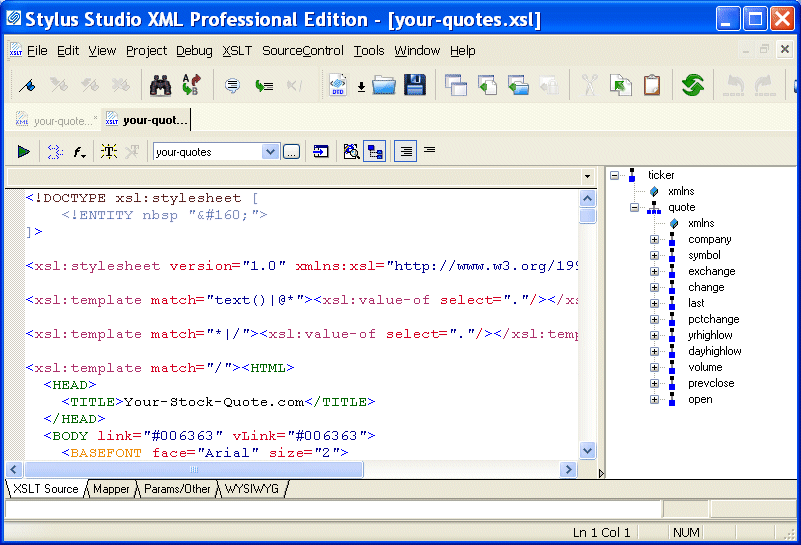
your-quotes.xsl. Stylus Studio displays the
your-quotes.xsl document in the
XSLT Source tab of the XSLT editor.
As with the XML Editor, Stylus Studio uses different colors to distinguish markup, tag names, and data in the XSLT Editor. |

Open XSLT Architecture
Learn how Stylus Studio's Open XSLT Architecture enables you to use any of the popular industry-standard XSLT processors (like Saxon, Xalan-J, MSXML, Microsoft .NET, and others) for all your XSLT development tasks.
DTD Validator
This page talks about Stylus Studio's DTD Validator it has the ability to specify any third-party XML parsers and validators, real-time syntax checking and DTD validation error reporting, backmapping, integrating third-party DTD validators and more!
Validating X12 Documents with XML Schemas
Either before or after transforming X12 EDI content, generated XML Schemas will make sure that we have all of the necessary components, our codes are all according to the standard codelists, and every little delimiter is in the right place.
XQuery Integration
Learn how new XQuery technologies can simplify legacy data integration by leveraging industry standards, proven open-source XML processing components, and Stylus Studio's integrated XQuery & XML tools.