Cart
Cart
|
Home > Online Product Documentation > Table of Contents > Constructing Your Own Adapter URL Constructing Your Own Adapter URLGenerally speaking, you should use Stylus Studio to construct adapter URLs, which you can then copy, as strings, into a Java application. Adapter URLs can be complex - properties and their values vary from one adapter to another, for example - so using Stylus Studio to construct them helps reduce errors in your applications.
Using the URL in the Select XML Converter Dialog BoxTo construct an adapter URL using the URL in the Select XML Converter dialog box:
1. Use the adapter to open a file as an XML document in Stylus Studio. This can be a user-defined or built-in adapter, as appropriate. See
How to Open a File Using an Adapter if you need help with this step.
2. Before clicking
OK to complete the conversion, copy the adapter URL in the
URL field of the
Select XML Converter dialog box (see
Figure 202).
3. Click
OK to complete the conversion.
4. Paste the adapter URL into your Java program.
Using the URL in the Properties WindowTo construct an adapter URL using the URL in the Properties window:
1. Use the adapter to open a file as an XML document in Stylus Studio. This can be a user-defined or built-in adapter, as appropriate. See
How to Open a File Using an Adapter if you need help with this step.
2. Open a new document in any Stylus Studio text editor (for example,
File > New > Java: Text Editor).
The purpose of this step is to provide an editor into which you can drag-and-drop the adapter URL for the document you created in step 1.
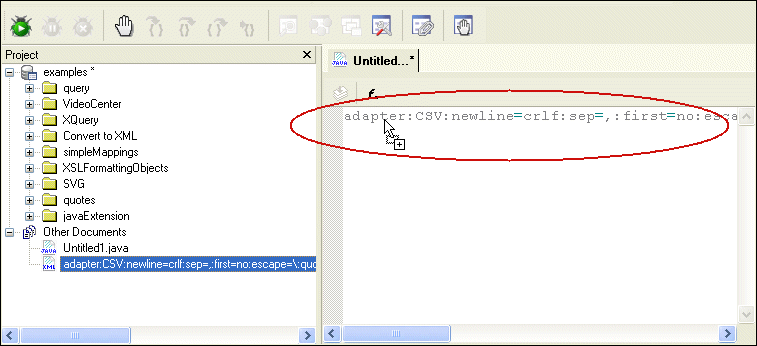
3. Drag the document you created in
step 1from the
Project window and drop it into the text editor associated with the document you created in
step 2.
The complete URL appears in the text editor.
4. Copy the complete adapter URL.
5. Paste the adapter URL into your Java program.
6. Escape characters as required for strings in Java programs. For example,
escape=\:quotes='" becomes
escape=\\:quotes='\" (the single quote does not need to be escaped).
|

XML PRODUCTIVITY THROUGH INNOVATION ™