Home >
Online Product Documentation >
Table of Contents >
Adapter URLs
Adapter URLs
Stylus Studio uses URLs extensively to reach a variety of data sources. For example, if you use the built-in CSV adapter to open the
three.txt file in the
\examples\Adapters directory as an XML document, Stylus Studio builds the following URL:
adapter:CSV:newline=crlf:sep=,:first=no:escape=\:quotes="'?file:///c:/Program Files/Stylus Studio XML Professional Edition/examples/Adapters/three.txt
The instructions to the adapter engine from this instance of the adapter URL are described in
Table 23.
|
Instruction
|
Adapter URL String
|
|
Use the Comma-Separated Values adapter
|
adapter:csv
|
|
The line separator in the source file is a carriage return/line feed
|
newline=crlf
|
|
The column separator in the source file is a comma
|
sep=,
|
|
The values in the first row of the source file should be used to supply field names
|
first=yes
|
|
The escape character in the source file is a slash \
|
escape=\
|
|
The quote characters in the source file are " and
'
|
quotes="'
|
|
The source file is three.txt
|
file:///c:/Program Files/Stylus Studio XML Professional Edition/examples/Adapters/three.txt
|
Table 23. Parts of an Adapter URL
While the basic format of the adapter URL is the same from one adapter to another, there are differences. For example:
- Built-in adapters have different properties. You should always use Stylus Studio to build your adapter URLs to be sure that it uses valid properties and values. See
Constructing Your Own Adapter URL for more information.
- The
adapter scheme can also be used to reference a user-defined adapter (a
.conv file). In this case, the adapter URL specifies only the location of the
.conv file; the adapter file itself contains information about its property settings. An adapter URL that references a user-defined adapter might look like this:
adapter:///myAdapter.conv?file:inventory.txt
- Property names in adapter URLs use an internal (generally, abbreviated) format, different from what is displayed in properties list in the
Select XML Converter dialog box. Again, to avoid errors in your applications, use Stylus Studio to build your adapter URLs.
Where Adapter URLs are Displayed in Stylus Studio
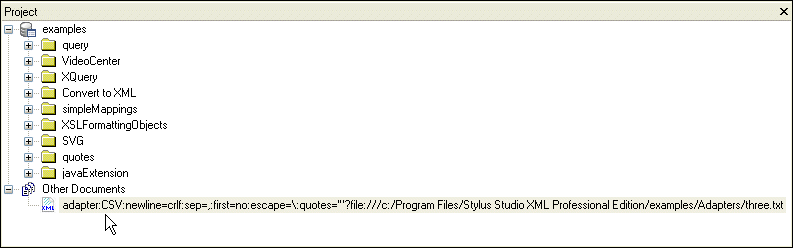
Adapter URLs are displayed
|
|
Figure 201. Adapter URL Displayed in Project WIndow
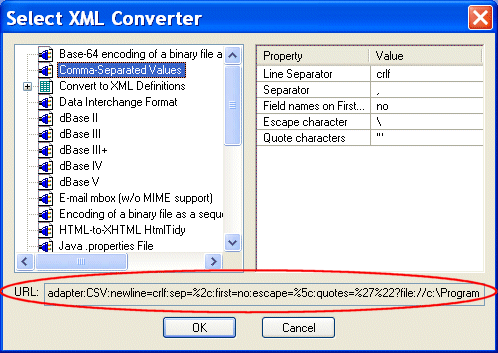
- In the
URL field of the
Select XML Converter dialog box, as shown in
Figure 202.
|
|
Figure 202. Adapter URL Displayed in the Select XML Converter Dialog Box
|
Note
|
|
Adapter URLs in the
URL field of the
Select XML Converter dialog box are displayed using escape characters.
|
You can use either as sources for the adapter URL strings in your Java applications. See
Constructing Your Own Adapter URL for more information.
 Cart
Cart